


From wall art and fabric printing to packaging, signage, and product marking, stencils are used in a wide range of creative and commercial applications. The quality of the finished stencil depends not only on the material and design, but also on the stencil cutting machine used to produce it.
A good stencil maker machine should create clean edges, preserve narrow bridges, and reproduce detailed designs consistently. However, manual tools, blade cutters, CNC routers, and laser cutters differ significantly in precision, speed, material compatibility, and cost.
This guide compares the main types of stencil machines and explains how to choose the best stencil cutting machine for paper, vinyl, plastic, Mylar, and rigid stencil materials.

In this article:
- Part 1: What is a Stencil Cutting Machine
- Part 2: 4 Types of Stencil Cutting Machines
- Type 1: Manual Stencil Cutting Tools
- Type 2: Plotter Machines
- Type 3: CNC Router Machines
- Type 4: Laser Engraving & Cutting Machine
- Part 3: Why Laser Cutting Machine is the Best Stencil Cutting Machine
- FAQs: Hot Questions about Stencil Cutting Machine
Part 1: What Is a Stencil Cutting Machine?
A stencil cutting machine cuts letters, logos, patterns, or shapes from a flat sheet to create a masking template. Paint, ink, etching cream, or another medium passes through the cut-out areas to transfer the design onto walls, fabric, wood, metal, packaging, and other surfaces.
Most digital stencil machines work with vector files. The machine follows the defined paths and removes or separates the material with a blade, router bit, or laser beam. The right cutting method helps produce cleaner edges, stronger bridges, and more consistent copies.

What Makes a Good Stencil?
A well-made stencil should provide:
- Clean edges: Smooth, accurate cuts help reduce paint bleeding.
- Sufficient detail: Small text and intricate shapes remain recognizable.
- Strong bridges: Narrow connections hold enclosed areas in place.
- Suitable durability: The material withstands the intended number of uses and cleaning cycles.
- Consistent results: Multiple copies match the original design.
The design must also be suitable for stencil cutting. Letters such as A, B, O, and P need bridges to prevent their enclosed centers from falling out.
Common Stencil Materials
The best material depends on whether the stencil is disposable, adhesive, washable, flexible, or rigid:
- Paper and cardstock: Affordable options for prototypes and short-term use.
- Vinyl and masking film: Adhesive materials commonly used for single-use painting and etching masks.
- Mylar or PET film: Flexible, washable, and widely used for reusable stencils.
- Polypropylene: A flexible, chemical-resistant option, although laser compatibility must be confirmed before cutting.
- Acrylic: A rigid material for durable templates and guides.
- MDF and plywood: Suitable for thicker spray-paint templates and signs.
Reusable stencil films are commonly sold in thicknesses such as 4, 7.5, 10, and 14 mil. A thicker sheet is usually more durable, while a thinner sheet bends more easily around curved surfaces. Always confirm that the chosen material is compatible with your cutting process.
Part 2: 4 Types of Stencil Cutting Machines
The four main options are manual cutting tools, blade cutting machines, CNC routers, and laser cutters. Each type suits different materials, design complexity, production volumes, and budgets.
Type 1: Manual Stencil Cutting Tools
Craft knives, precision blades, and heated stencil cutters offer the simplest way to make a stencil. The user places the material on a cutting mat and manually follows a printed or drawn outline.
Manual tools are inexpensive and practical for basic paper, cardstock, and thin-film projects. However, cutting detailed designs takes time, and producing several identical copies is difficult.
Pros:
- Low cost: Requires little initial investment.
- Simple setup: No design software or machine configuration is required.
- Portable: Most tools can be used without electricity.
Cons:
- Limited precision: Small text and intricate designs are difficult to cut cleanly.
- Slow production: Every stencil must be cut by hand.
- Poor repeatability: Copies may vary in shape and size.
- Limited materials: Thick or rigid sheets are difficult to process.
Type 2: Blade Cutting Machines
Electronic blade cutters—also called craft cutters, vinyl cutters, or cutting plotters—move a small blade along vector paths. Popular machines in this category can cut paper, cardstock, adhesive vinyl, masking film, and compatible stencil sheets.
A compact blade-based stencil maker machine is a good choice for craft rooms, schools, sign shops, and small businesses. It is especially useful for adhesive masks and flexible materials that can be secured to a cutting mat.
Pros:
- Affordable digital workflow: Suitable for beginners and low-volume businesses.
- Clean cuts in thin media: Performs well on paper, vinyl, and compatible stencil films.
- Good repeatability: Saved files can be used to create matching copies.
Cons:
- Limited material thickness: Not designed for most thick or rigid sheets.
- Blade wear: Blades become dull and require replacement.
- Material movement: Thin details may lift, drag, or tear if the blade and mat are not set correctly.
- Weeding: Adhesive stencil designs often require manual removal of cut pieces.
Type 3: CNC Router Machines
A CNC router uses a rotating bit to cut computer-generated toolpaths. It is better suited to thick, rigid stencil materials such as MDF, plywood, and acrylic than to thin flexible films.
CNC routers are useful for large signs, painting guides, industrial templates, and other applications where stiffness matters more than very fine detail. Bit diameter limits the size of internal corners and narrow gaps, and some materials require sanding after cutting.
Pros:
- Strong cutting capability: Processes thick wood, MDF, acrylic, and other rigid sheets.
- Large-format options: Suitable for signs and oversized templates.
- Repeatable workflow: Digital toolpaths support consistent production.
Cons:
- Limited fine detail: The router bit cannot create details narrower than its cutting diameter.
- Finishing may be required: Edges can have burrs, fibers, or machining marks.
- More space and maintenance: The machine, dust collection system, and cutting tools require room and upkeep.
Type 4: Laser Cutting Machines
A laser cutting machine follows vector paths with a focused beam instead of a physical blade. Because the process is non-contact, there is no blade drag or cutting pressure on delicate details.
A laser cutter for stencils can produce small lettering, intricate logos, and repeatable patterns in compatible materials. Depending on the laser type and power, suitable materials may include paper, cardstock, wood, acrylic, and certain laser-safe stencil films.
Material safety must be verified before cutting. PVC and vinyl containing chlorine must never be laser cut because they can release corrosive and hazardous fumes. Do not assume that every sheet sold as “stencil plastic” is laser-safe; obtain its exact composition or safety data from the supplier.
Pros:
- High precision: Suitable for detailed patterns and small internal features.
- Non-contact cutting: Eliminates blade drag and mechanical tool pressure.
- No cutting-bit wear: There is no blade or router bit to replace.
- Broad capabilities: One machine may process both stencil materials and other craft or production materials.
- High repeatability: Digital settings can be reused for batch production.
Cons:
- Higher initial cost: Usually costs more than manual tools or entry-level craft cutters.
- Ventilation required: Cutting fumes and particles must be extracted safely.
- Material restrictions: Some plastics are unsafe or unsuitable for laser processing.
- Heat-affected edges: Thin plastic films may curl, melt, or discolor if the settings are incorrect.
Part 3: Which Stencil Cutting Machine Is Best?
| Machine Type | Best For | Detail Level | Typical Materials | Repeatability | Relative Cost |
|---|---|---|---|---|---|
| Manual Cutting Tools | Simple, one-off projects | Low to medium | Paper, cardstock, thin film | Low | Low |
| Blade Cutting Machines | Crafts and adhesive masks | Medium to high | Vinyl, paper, cardstock, compatible film | High | Low to medium |
| CNC Routers | Thick, rigid templates | Medium | MDF, plywood, acrylic | High | Medium to high |
| Laser Cutting Machines | Detailed, multi-material production | High | Laser-safe film, paper, wood, acrylic | High | Medium to high |
There is no single best machine for every stencil project. A manual cutter is enough for occasional simple designs, while a Cricut-style blade cutter is often the most practical option for paper, adhesive vinyl, and thin reusable sheets. A CNC router is better for thick, rigid templates.
A laser cutter is the strongest all-around option when your priorities are fine detail, non-contact processing, repeatable production, and the ability to work with several compatible materials. However, it also requires a higher budget, proper ventilation, and careful material verification.
Reason #1: Precise Cutting for Detailed Designs
A focused laser beam can follow small lettering, narrow gaps, and intricate vector paths without a blade dragging across the sheet. This makes laser cutting particularly useful for logos, decorative patterns, and complex reusable stencils.
Reason #2: Compatibility with Flexible and Rigid Materials
Depending on the laser source and machine power, a laser stencil cutter may process:
- Laser-safe stencil film
- Paper and cardstock
- Wood and plywood
- MDF
- Compatible acrylic
Always check the exact material composition. A material should not be laser cut simply because it is thin enough to fit inside the machine.
Reason #3: Non-Contact Cutting
Because the laser does not touch the workpiece, there is no blade pressure, mechanical tearing, or cutting-bit diameter to limit narrow details. Correct focus, suitable settings, good material support, and effective air extraction are still necessary for clean results.
Reason #4: Efficient, Repeatable Production
Once the design and material settings have been tested, the same file can be used to produce matching copies. A jig or positioning guide can further improve alignment when making stencils in batches.
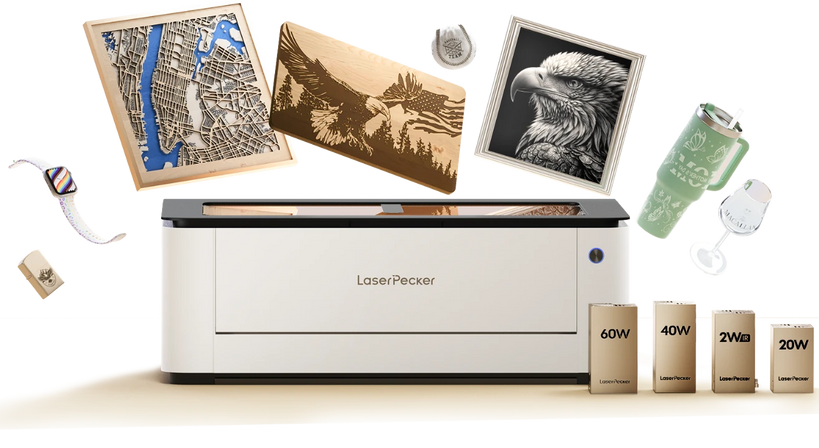
Recommended Large Stencil Cutting Machine: LaserPecker LX2
For users who need a larger working area and flexible production capabilities, the LaserPecker LX2 is a desktop laser cutter designed for detailed cutting, camera-assisted positioning, and repeatable workflows.
-
500 × 305 mm Working Area
The large workspace accommodates small craft templates as well as larger stencil layouts, reducing the need to divide or reposition a design. -
20W, 40W, or 60W Blue-Laser Options
Multiple power configurations allow users to choose a system based on their target materials, cutting requirements, and production volume. -
12MP Camera and Autofocus
Camera-assisted positioning and automatic focusing simplify layout alignment and help maintain a repeatable workflow. -
Up to 1,000 mm/s Processing Speed
Fast motion and software-controlled paths support efficient cutting and batch production. -
Optional 2W Infrared Laser
The infrared module expands the machine's engraving and marking capabilities. It is not a substitute for the blue laser when cutting common stencil materials.
Before using the LX2 as a plastic stencil cutting machine or Mylar stencil cutting machine, verify the exact chemical composition with the material supplier and run a small test. Use suitable extraction, air assist, and machine settings to control smoke, heat, and edge quality.
FAQs: Hot Questions About Stencil Cutting Machines
Q1. What machine is best for cutting stencils?
The best machine depends on the material and design. A blade cutter is usually best for paper, adhesive vinyl, and simple reusable films. A laser cutter is better for intricate designs, batch production, and a broader range of laser-safe materials. A CNC router is more suitable for thick MDF, plywood, or acrylic templates.
Q2. What are the different types of stencil cutting machines?
The main types are manual cutting tools, electronic blade cutters or plotters, CNC routers, and laser cutting machines. Manual tools suit simple one-off projects; blade cutters handle thin flexible media; CNC routers process thick rigid sheets; and laser cutters provide detailed, non-contact cutting in compatible materials.
Q3. Can a Cricut machine cut reusable stencils?
Yes. A Cricut or similar craft cutter can cut compatible reusable stencil sheets, including certain Mylar or plastic films. The result depends on the sheet thickness, blade type, cutting mat, and machine settings. Check both the material supplier's instructions and your Cricut model's supported-material guidance before cutting.
Q4. Can you cut Mylar stencils with a laser cutter?
Some Mylar or PET films can be laser cut, but compatibility should never be assumed. Confirm the exact material composition and obtain the supplier's laser-processing guidance or safety data. Thin films can melt, curl, or produce poor edges if the power is too high or ventilation is inadequate. Never laser cut PVC or chlorine-containing vinyl.
Q5. Is a laser cutter or blade cutter better for making stencils?
A blade cutter is generally more affordable and convenient for paper, adhesive masks, and basic craft stencils. A laser cutter is better for fine details, non-contact processing, and repeatable production across several compatible materials. Choose according to your primary material rather than assuming that the more powerful machine is always better.
Q6. What thickness of Mylar can a stencil cutting machine cut?
Reusable Mylar stencil sheets are commonly available in 4, 7.5, 10, and 14 mil thicknesses—approximately 0.10, 0.19, 0.25, and 0.36 mm. Many craft cutters can process at least some of these gauges, but the exact limit depends on the machine, blade, mat, and material. Laser results also vary by wavelength, power, focus, speed, and film composition, so test a small sample first.
Q7. What materials can you use to make reusable stencils?
Common reusable materials include Mylar or PET film, polypropylene sheets, acrylic, thin wood, and other washable plastics. Mylar is popular because it is flexible, durable, and easy to clean. Acrylic and wood are more rigid but less suitable for curved surfaces. Always verify that the material is compatible with the chosen cutting method.
Conclusion
The right stencil cutting machine depends on what you plan to make. Manual tools are inexpensive for occasional projects, while blade cutters are convenient for paper, adhesive masks, and thin reusable films. CNC routers are better suited to thick, rigid templates.
For detailed designs, repeatable production, and greater material flexibility, a laser-based stencil making machine can be a strong long-term option. Before cutting any plastic stencil sheet, confirm its chemical composition, test the settings on a small sample, and use proper ventilation. Matching the machine to the material, stencil size, and production volume will produce better results than choosing by power alone.


