


Laser engraving maps turns meaningful locations into personalized artwork on wood, slate, acrylic, leather, and metal.
Unlike printed maps, laser engraved maps permanently add streets, coastlines, coordinates, and personal messages to the material surface.
This guide covers suitable materials, recommended equipment, and practical techniques for creating detailed map engravings.

In this article:
- Part 1: Understanding Laser Engraving Maps
- 1.1 What Is Laser Engraving Maps
- 1.2 How Does Laser Engraving Create Map Designs
- 1.3 What Type of Laser Is Best for Map Engraving
- Part 2: Why Choose Laser Engraving for Maps
- Part 3: What Materials Can Be Used for Laser Engraved Maps
- Case Study: How to Laser Engrave a Personalized Hometown Map on Wood in 5 Steps
- FAQs: Hot Questions about Laser Engraving Maps
Part 1: Understanding Laser Engraving Maps
Laser engraving maps turns digital map designs into personalized artwork by marking details directly onto a single material surface.
Common materials include wood, slate, leather, acrylic, and metal. These maps are often created as hometown art, wedding gifts, travel displays, and wall decorations.
Two common methods are Line Map Engraving, which creates clear outlines, and Depth Map Engraving, which uses different depths to add texture and dimension.
1.1 What Is Laser Engraving Maps?
Laser engraving maps uses a laser engraver to transfer digital map designs onto a material. The laser removes or modifies the surface to create roads, coastlines, boundaries, and other geographic details.
Unlike layered maps, laser-engraved maps are created directly on a single workpiece. Their appearance varies depending on the material and engraving method.
1.2 How Does Laser Engraving Create Map Designs?
The process begins by converting map information into a laser-compatible file. Vector formats such as SVG keep roads, text, boundaries, and coordinates clear and scalable.
The laser follows the prepared paths and applies controlled energy to the surface. Adjusting the power, speed, resolution, and number of passes changes the line sharpness, depth, and contrast.
Because the design is engraved onto one surface rather than assembled from separate layers, the material keeps its original shape and structure.
1.3 What Type of Laser Is Best for Map Engraving?
The best laser depends on the material, map size, design detail, and intended use. Diode lasers are practical for wood and slate, while CO2, fiber, and UV lasers suit other materials and production needs.
For detailed maps, consider engraving accuracy, working area, positioning features, and material compatibility.
Diode Laser for Wood and Slate Map Engraving
Diode lasers can create clear lines and strong contrast on wood and slate. They are suitable for hometown maps, travel displays, wall art, and personalized gifts.
CO2 Laser for Large-Format Map Engraving
CO2 lasers can engrave wood, acrylic, leather, and some types of stone. They are commonly used for large wall maps, signs, decorative panels, and higher-volume production.
Working area, ventilation, and material handling are important when choosing a CO2 laser for oversized projects.
Fiber Laser for Metal Map Engraving
Fiber lasers create precise, permanent marks on aluminum, stainless steel, and other metals. They are suitable for map plaques, coordinate signs, and durable decorative pieces.
They are generally best for users who mainly work with metal or need a professional production workflow.
UV Laser for Glass and Transparent Acrylic Map Engraving
UV lasers can mark glass, transparent acrylic, and heat-sensitive materials with minimal heat impact, reducing the risk of cracking, melting, or deformation.
They can produce fine streets, coordinates, labels, and outlines for glass maps, illuminated acrylic panels, modern decor, and premium gifts.
Part 2: Why Choose Laser Engraving for Maps?
Laser engraving can reproduce detailed geographic features and create durable, personalized maps for gifts, home decor, and small business products.
Reason 1: Create Personalized Home and Travel Memories
Laser-engraved maps can preserve meaningful places such as hometowns, wedding venues, first homes, and travel destinations.
Names, coordinates, dates, and messages can be added to create personalized wedding, anniversary, housewarming, and travel gifts.
Reason 2: Reproduce Fine Streets and Geographic Details
Laser engraving can reproduce small roads, waterways, boundaries, and neighborhood layouts directly from a digital map.
A clear vector file, suitable material, and correct settings help produce sharp details that are difficult to achieve by hand.
Reason 3: Suitable for Home Decor and Custom Gifts
Engraved maps can be made from wood, acrylic, slate, and metal to suit natural, modern, or professional spaces.
They are also popular as customized wedding maps, new-home gifts, anniversary keepsakes, and office decorations.
Reason 4: Produce Repeatable Designs for Small Businesses
Once a map template is prepared, sellers can quickly change locations, addresses, coordinates, and customer details for new orders.
This repeatable workflow helps personalized gift shops and map decor businesses maintain consistent quality while reducing manual work.
Recommended Laser Engraver for Detailed Map Projects: LaserPecker LX2
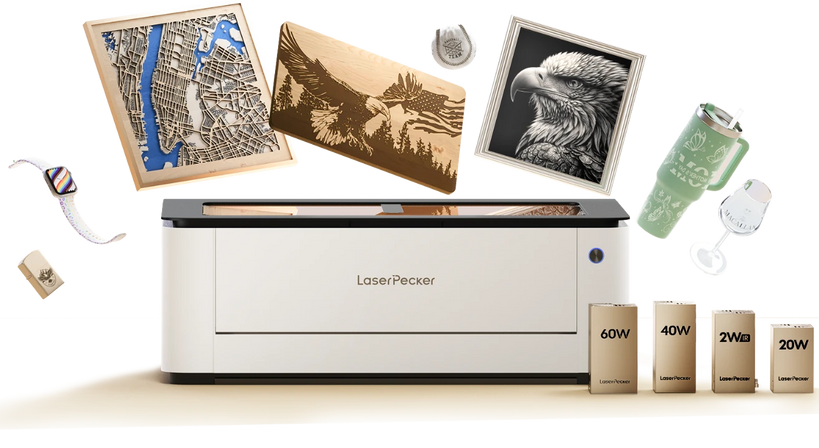
The LaserPecker LX2 is suitable for engraving detailed maps on wood, slate, leather, and other compatible materials. Its large working area can accommodate city maps, travel displays, coordinate signs, and personalized wall art.
-
500 × 305 mm Working Area
Provides enough space for large city maps, wooden wall decor, and multiple smaller map pieces in one project. -
12MP/6K Overhead Camera
Previews the material and design placement, helping users position streets, coordinates, borders, and text accurately. -
Point-to-Shape™ Positioning
Aligns map artwork with the actual shape of the workpiece, which is useful for irregular wood panels, slate pieces, and custom signs. -
Precision of ≤0.01 mm
Helps preserve thin roads, small labels, coastlines, and other fine geographic details in complex map designs.
Part 3: What Materials Can Be Used for Laser Engraved Maps?
The material affects the appearance, contrast, texture, and durability of a laser-engraved map.
Common options include wood, acrylic, glass, leather, slate, anodized aluminum, and other metals.
Wood
Wood provides a natural appearance and clear contrast. Basswood, plywood, and hardwood are suitable for city maps, travel maps, and wall decor.
Its grain adds character, while deeper engraving can give roads, borders, and geographic details more texture.
Acrylic
Acrylic is suitable for modern map designs, office decor, business displays, and LED-backlit projects.
Engraving creates a frosted or contrasting finish that clearly shows streets, coordinates, and outlines.
Glass
Glass creates elegant map panels, commemorative gifts, and decorative displays.
UV lasers can produce fine details with minimal heat impact, helping reduce damage while maintaining a clean finish.
Leather
Leather gives engraved maps a soft and personalized appearance. It works well for travel maps, journals, passport covers, and custom gifts.
Slate
Slate produces strong contrast and is suitable for decorative maps, memorial pieces, and rustic-style decor.
Its natural surface variations make each hometown, country, or lake map unique.
Map Coins
Map coins can feature city streets, coordinates, travel destinations, or other meaningful locations as personalized keepsakes.
Brass, stainless steel, and aluminum are common choices. Precise engraving is needed to keep small roads, symbols, and text clear.
Anodized Aluminum
Anodized aluminum is suitable for durable coordinate signs, city plaques, and office displays.
The laser removes or changes the coating to create a clean, contrasting mark with fine details.
Metal
Stainless steel, aluminum, brass, and titanium can be used for durable map plaques, signs, and premium decorative pieces.
Fiber lasers create precise, permanent marks and are well suited to detailed metal map designs.
Case Study: How to Laser Engrave a Personalized Hometown Map on Wood in 5 Steps
This project creates a wooden map of downtown Austin, Texas, with a family name, GPS coordinates, and an established year.
The map is engraved directly onto a basswood board, making it suitable for wall decor, housewarming gifts, and wedding gifts.
Preparation Checklist
- Basswood board
- Laser Engraving Machine
- LaserPecker Design Space or LightBurn
- SVG city map file
- Sandpaper
- Wood finish (optional)
- Scrap wood for testing
Step 1: Choose the Location to Engrave
Select a meaningful place, such as a hometown, wedding venue, first home, or favorite travel destination.
Download or create a clean vector map that includes the main streets, landmarks, and other required details.
Step 2: Set Up the LaserPecker LX2 and Prepare the Wood
Secure the basswood board, import the SVG file into LaserPecker Design Space or LightBurn, and adjust its size and position.
The LaserPecker LX2 offers a 500 × 305 mm working area and camera-assisted positioning for aligning detailed map designs.
Step 3: Create Your Personalized Map Design
Add simple personalized details while keeping the street layout clear and readable.
Common customization elements include:
- City street map, such as Downtown Austin
- Family name, such as “The Carter Family”
- GPS coordinates
- Established year, such as “Est. 2024”
- Small compass icon
Step 4: Configure the Laser Settings and Run a Test
Test the design on scrap wood to find suitable power, speed, and resolution settings.
Use settings that keep streets and text clear without removing too much material.
Step 5: Engrave, Finish, and Display the Map
Engrave the final board, then remove any dust with a soft brush or cloth.
Apply a wood finish or protective coating if desired, then display the map or give it as a personalized gift.
FAQs: Hot Questions about Laser Engraving Maps
Q1. Can you laser engrave maps?
Yes, maps can be laser engraved on wood, slate, acrylic, leather, anodized aluminum, and other compatible materials.
A suitable design and correct settings can reproduce streets, coastlines, coordinates, and other geographic details.
Q2. How do you convert a map into a laser engraving file?
Create or download a digital map and convert it into a vector format such as SVG or DXF.
Before engraving, simplify unnecessary details, adjust line thickness, and add any personalized text or symbols.
Q3. What materials are best for engraved maps?
Wood offers a natural appearance, acrylic suits modern and illuminated displays, and slate provides a durable stone finish.
Anodized aluminum is a good choice for professional coordinate signs and metal map displays.
Q4. Can you engrave Google Maps or street maps?
Yes, street maps can be prepared for laser engraving, but the map data should be simplified before use.
A clean vector file with selected roads, labels, and markers usually produces clearer results than a complex map image.
Q5. What size works best for laser engraved maps?
Small maps work well for gifts and desk decor, while larger maps provide more space for detailed streets and geographic features.
The best size depends on the design complexity, material, display purpose, and machine working area.
Q6. Can you add names and coordinates to a map engraving?
Yes, names, GPS coordinates, dates, addresses, messages, and compass icons can be added to personalize a map.
These details are commonly used for wedding, anniversary, housewarming, and travel keepsakes.
Q7. Are laser engraved maps good gifts?
Yes, laser-engraved maps make meaningful gifts because they can represent a specific place or memory.
They are popular for weddings, anniversaries, housewarmings, and travel celebrations.
Q8. What is the best laser engraver for map projects?
The best machine depends on the material, map size, and production needs. Detailed or large-format projects benefit from a spacious working area and accurate positioning.
The LaserPecker LX2 offers a 500 × 305 mm working area and camera-assisted positioning for detailed map engraving projects.
Conclusion
Laser engraving maps turns meaningful locations into lasting artwork for home decor, gifts, and custom products. Good vector files, simplified designs, suitable materials, and test engravings help produce clear results. For larger projects, the LaserPecker LX2 provides a large working area, fast engraving, and accurate positioning.


