


CNC routers and laser cutters are widely used in woodworking, metalworking, sign making, prototyping, and custom product manufacturing. Both machines follow digital designs to cut or engrave materials, but they process those materials in fundamentally different ways.
A CNC router uses a rotating cutting tool to remove material through direct contact. A laser cutter uses a focused beam to cut, engrave, or mark the surface without a physical cutting tool. These differences affect cutting depth, precision, material compatibility, speed, maintenance, and the types of projects each machine handles best.
This CNC vs laser cutter guide explains how both technologies work and compares their main advantages, limitations, costs, and applications. It will help you choose between a CNC machine vs laser cutter based on your materials, workspace, budget, and production needs.

In this article:
- Part 1: What is a CNC Cutter
- Part 2: What is a Laser Cutter
- Part 3: CNC Cutter vs Laser Cutter: 8 Key Differences
- Part 4: CNC Cutter vs Laser Cutter: How to Choose
- Part 5: FAQ for CNC vs Laser Cutter
Part 1: What Is a CNC Router?
A CNC router, also known as a CNC cutter, is a computer-controlled machine that cuts, carves, drills, or shapes a workpiece with a rotating bit. CNC stands for computer numerical control. The machine converts designs created in CAD and CAM software into programmed movements for the cutting tool.
Most CNC routers move along three axes. The X- and Y-axes control horizontal movement, while the Z-axis controls cutting depth. This allows the machine to remove material in multiple passes and create holes, pockets, grooves, beveled edges, joinery, and three-dimensional reliefs.
Because the cutting tool physically contacts the workpiece, a CNC router can process thick wood, MDF, plywood, plastics, foam, composites, and machinable metals. CNC routing is widely used for furniture, cabinetry, molds, signs, prototypes, mechanical parts, and other projects that require controlled cutting depth.

Pros and Cons of CNC Cutting Machines
Pros:
- Processes thick wood, plastics, composites, foam, and suitable metals.
- Creates deep cuts, pockets, grooves, beveled edges, and 3D reliefs.
- Provides precise control over cutting depth through the Z-axis.
- Works well for furniture, molds, structural parts, and production applications.
Cons:
- Cutting bits wear out and require regular inspection or replacement.
- Physical cutting produces noise, vibration, dust, chips, and shavings.
- Workpieces must be secured properly before machining.
- CAM setup, tool selection, feeds, speeds, and workholding require time to learn.
Part 2: What Is a Laser Cutter?
A laser cutter is a computer-controlled machine that directs a focused beam of light along a programmed path. Depending on the laser source, power, and material, the beam cuts, engraves, or marks the surface by heating, melting, vaporizing, or ablating it.
Unlike a CNC router, a laser cutter does not use a physical cutting bit. This non-contact process makes it particularly effective for fine text, detailed patterns, narrow cuts, and sharp internal corners. Laser cutters are commonly used for signs, models, leather goods, packaging, personalized gifts, prototypes, and small-batch production.
A machine such as the LaserPecker LX2 can process compatible materials such as wood, acrylic, leather, paper, and fabric. The exact material range and cutting capacity depend on the installed laser module.
Part 3: CNC vs Laser Cutter: 8 Key Differences
CNC routers and laser cutters can both turn digital designs into finished parts, but their processing methods lead to different results. The following CNC vs laser cutter comparison covers the eight factors that matter most when choosing a machine.
1. Cutting Method
A CNC router uses a rotating bit that physically contacts and removes material. By controlling the cutting depth, it can mill surfaces, drill holes, cut pockets, create grooves, and shape three-dimensional parts.
A laser cutter uses a focused beam to heat, melt, vaporize, or ablate material. Because it is a non-contact process, it applies no mechanical cutting force to the workpiece.
2. Precision and Accuracy
Laser cutters are particularly effective for fine text, detailed linework, small features, narrow kerfs, and sharp internal corners. However, heat can produce darkened edges, melting, or a heat-affected zone on certain materials.
CNC routers can achieve excellent dimensional accuracy and controlled cutting depth. They are particularly effective for fitted parts, pockets, joinery, and mechanical features, although the router bit diameter limits the minimum internal corner radius.
3. Applicable Materials
CNC routers: Commonly process hardwood, MDF, plywood, plastics, foam, composites, and machinable metals such as aluminum and brass. Material compatibility depends on the spindle, cutting tool, machine rigidity, and operating parameters.
Laser cutters: Depending on the laser source, they can process wood, acrylic, leather, paper, fabric, coated surfaces, selected plastics, and certain metals. Diode, CO₂, fiber, and infrared lasers do not share the same material compatibility or cutting capacity.
4. Cutting and Engraving Speed
Laser cutters are often faster for surface engraving, intricate linework, and cutting compatible sheet materials because they do not mechanically remove large volumes of material.
CNC routers may require multiple passes for thick stock or deep features. Setup can also include tool changes, workholding, and chip removal. For deep carving and three-dimensional parts, however, CNC routing is usually the more practical process.

5. Cost and Maintenance
The initial price varies widely for both technologies. A small CNC router may cost less than an enclosed high-power laser cutter, but industrial CNC equipment can be considerably more expensive. The purchase price alone therefore does not determine which option is more affordable.
CNC routers have recurring costs for cutting bits, spoilboards, lubrication, workholding, and dust collection. Laser cutters require ventilation or filtration, optical cleaning, air assist, and eventual replacement of certain consumable components.
6. Size and Footprint
Large CNC routers typically need a dedicated workshop with space for the machine, workpiece loading, dust collection, and material storage. Compact desktop CNC machines are available, but their working areas and cutting capacities are smaller.
Laser cutters also range from compact desktop units to large industrial systems. Desktop models can fit in studios, classrooms, or small workshops, provided that adequate ventilation, fire safety, and operating clearance are available.

7. Noise Level
CNC routers are generally louder because of the spindle, cutting tool, material contact, dust extractor, and mechanical movement.
Laser cutters typically produce less cutting noise, although exhaust fans, air assist, cooling systems, and air purifiers can still be clearly audible. Actual noise levels vary by machine and setup.
8. Residue and Cleanliness
CNC routing produces chips, sawdust, or shavings that require collection and regular cleanup. Fine dust from materials such as MDF may require effective extraction and respiratory precautions.
Laser cutting produces less solid debris but can generate smoke, fumes, soot, and residue. These emissions must be controlled with an exhaust or filtration system rather than treated as negligible.

CNC vs Laser Cutter Comparison Table
| Feature | CNC Router | Laser Cutter |
|---|---|---|
| Cutting method | Rotating tool physically removes material | Focused laser beam; non-contact process |
| Best suited for | Deep cuts, pockets, joinery, and 3D shapes | Fine engraving, intricate profiles, and sheet cutting |
| Typical materials | Thick wood, plastics, foam, composites, and machinable metals | Wood, acrylic, leather, paper, fabric, coated surfaces, and other laser-compatible materials |
| Detail and corners | Accurate, but internal corners are limited by bit diameter | Fine details, narrow kerfs, and sharp internal corners |
| 3D processing | Well suited to controlled-depth and 3D machining | Primarily 2D cutting and surface engraving |
| Speed | May require multiple passes for deep features | Often faster for engraving and compatible sheet materials |
| Maintenance | Bit replacement and mechanical maintenance | Optical cleaning, ventilation, and air-assist maintenance |
| Setup | Requires CAM, tool selection, and secure workholding | Requires focusing, material settings, ventilation, and fire monitoring |
| Noise | Generally loud due to mechanical cutting | Usually quieter, although fans and air assist produce noise |
| Waste and emissions | Produces dust, chips, and shavings | Produces smoke, fumes, soot, and light residue |
Part 4: CNC vs Laser Cutter: How to Choose?
The better option depends on your materials, required cutting depth, design complexity, workspace, production volume, and budget. Use the following guidelines when comparing a CNC machine vs laser cutter.
When to Choose a CNC Router
- Choose a CNC router if you regularly process thick wood, rigid plastics, composites, foam, or machinable metals.
- Use it for pockets, grooves, joinery, beveled edges, molds, relief carvings, and three-dimensional parts.
- Consider it when controlled cutting depth and dimensional fit matter more than very fine internal details.
- Make sure your workspace can accommodate workholding, cutting noise, chips, dust extraction, and tool maintenance.
When to Choose a Laser Cutter
- Choose a laser cutter for fine text, logos, intricate patterns, detailed engraving, and narrow profiles.
- Use it for compatible sheet materials such as wood, acrylic, leather, paper, and fabric.
- Consider it when you need to switch efficiently between cutting and surface engraving.
- Make sure your workspace has suitable ventilation or filtration and appropriate fire-safety measures.
LaserPecker LX2: A Laser Cutter for Detailed Production
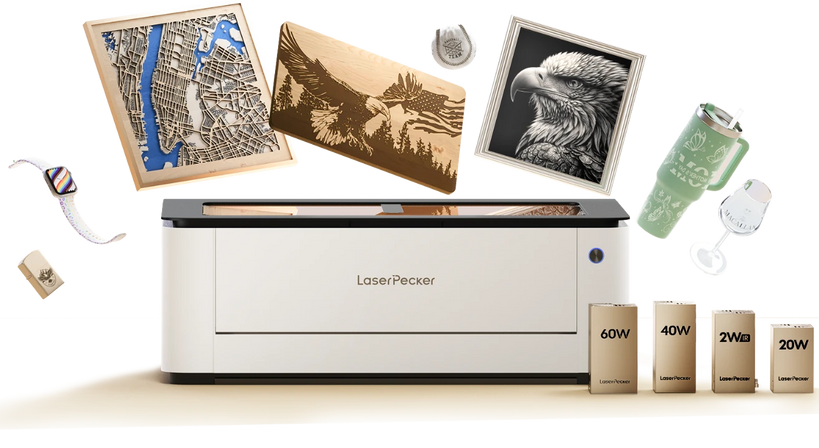
If your projects require precise cutting, detailed engraving, and a larger working area, consider the LaserPecker LX2 Laser Cutter. It features a 500 × 305 mm working area and supports interchangeable 20W, 40W, and 60W blue-diode laser modules. An optional 2W infrared module expands its marking capabilities on compatible metals and plastics.

The LX2 combines a 12MP camera, autofocus, and air assist to support visual positioning and consistent processing. Its blue-diode laser options can cut wood and dark opaque acrylic, while the infrared module is intended primarily for marking compatible metals and plastics. Actual cutting thickness depends on the installed module, material composition, focus, air assist, settings, and number of passes.
A laser cutter is not a complete replacement for a CNC router. If your projects require deep pockets, joinery, thick structural components, or complex three-dimensional contours, a CNC router remains the better choice. Workshops that need both deep shaping and fine surface detail may benefit from using the two technologies together.
Part 5: FAQ About CNC Routers vs Laser Cutters
Q1. What is the difference between a CNC router and a laser cutter?
A CNC router uses a rotating cutting tool to remove material through direct contact, while a laser cutter uses a focused beam in a non-contact process. CNC routers are better suited to deep cuts, pockets, joinery, and three-dimensional shaping. Laser cutters are particularly effective for fine engraving, narrow kerfs, sharp internal corners, and intricate two-dimensional designs.
Q2. Which is better, a CNC router or a laser cutter?
Neither machine is better for every project. A CNC router is generally better for thick materials, controlled-depth machining, mechanical parts, and 3D carving. A laser cutter is usually better for fine details, personalized products, surface engraving, and efficient cutting of compatible sheet materials. The right choice depends on what you plan to make.
Q3. Is a CNC router or laser cutter better for woodworking?
A CNC router is generally better for thick lumber, furniture parts, joinery, pockets, molds, and 3D reliefs. A laser cutter is better for detailed patterns, fine text, ornaments, inlays, models, and surface engraving. Woodworking businesses that offer both structural fabrication and personalization may benefit from using both machines.
Q4. Which machine is better for cutting thick materials?
A CNC router is usually more practical for thick wood, rigid plastics, foam, composites, and machinable metals because it can remove material in multiple controlled passes. A laser cutter may cut some thick materials, but its capacity depends heavily on the laser source, output power, material composition, focus, air assist, and number of passes.
Q5. Can a laser cutter create 3D carvings like a CNC router?
Not in the same way. Some laser systems can create grayscale engraving, shallow reliefs, or layered effects by varying power and speed. However, a CNC router provides direct Z-axis depth control and is generally better for deep reliefs, rounded contours, pockets, molds, and accurate three-dimensional geometry.
Q6. Is a CNC router more accurate than a laser cutter?
Accuracy depends on the machine, calibration, material, tooling, settings, and project type. Laser cutters often reproduce fine lines and small internal features more easily because the beam creates a narrow kerf. CNC routers can deliver excellent dimensional accuracy and depth control, but the cutting bit determines the smallest possible internal radius.
Q7. Which costs more to operate, a CNC router or a laser cutter?
Operating costs vary by machine and workload. CNC expenses can include cutting bits, spoilboards, workholding, lubrication, dust collection, and longer machining times. Laser expenses can include ventilation or filtration, air assist, optical maintenance, cooling, and replacement consumables. Compare total cost per finished part rather than considering the purchase price alone.
Q8. Should I buy a CNC router or a laser cutter for my small business?
Choose a CNC router if your business makes furniture parts, cabinetry, molds, dimensional signs, or thick three-dimensional components.
Choose a laser cutter if you produce personalized gifts, leather goods, models, engraved products, detailed signs, or other sheet-based designs. If your product range needs both deep machining and fine personalization, the two machines can complement each other as your business grows.
Conclusion
The central difference in the CNC machine vs laser cutter comparison is how each machine removes material. A CNC router uses a rotating tool and controlled cutting depth, making it well suited to thick stock, pockets, joinery, mechanical parts, and three-dimensional forms.
A laser cutter uses a focused beam, making it particularly effective for fine engraving, intricate profiles, narrow kerfs, and efficient processing of compatible sheet materials. Its non-contact operation also eliminates the need to replace worn cutting bits.
Choose a CNC router when depth, structure, and 3D machining are your priorities. Choose a laser cutter when fine detail, engraving speed, and flexible customization matter more. If your work requires both deep shaping and precise surface detail, the two technologies can form a highly effective production workflow.


