


The Glowforge Plus has long been one of the most recognizable desktop laser cutters on the market. Its beginner-friendly design and strong reputation have made it a popular choice for hobbyists, makers, and small business owners alike.
However, the laser engraving industry has changed dramatically in recent years. Today's users are looking for more than just an easy-to-use machine. They want faster workflows, offline operation, broader material compatibility, upgrade options, and a better overall value for their investment.
If you're considering a Glowforge Plus alternative, you're not alone. In this guide, we'll explore the most common reasons users look beyond the Glowforge Plus, compare it directly with the LaserPecker LX2, and explain why many makers see the LX2 as a more flexible and future-ready solution.

Part 1: Why People Look for a Glowforge Plus Alternative?
The Glowforge Plus remains one of the most well-known desktop laser cutters on the market. However, laser technology has evolved rapidly in recent years, giving makers more options than ever before.
Here are the five limitations that force makers start looking beyond the Glowforge Plus.
Limitation #1: Glowforge Uses a Cloud-based Workflow through Its Web App
The Glowforge Plus works through an online system, which means it needs an internet connection to run. Every design must be uploaded through Glowforge's website before the machine can start a job.
This requirement has been a concern for some users. In the Glowforge community, one user asked, "Is there any way I can use my Glowforge without internet?" The answer from the community was straightforward: "No, there's no way to use a Glowforge without an internet connection."

If your Wi-Fi stops working, your internet goes down, or Glowforge's servers are unavailable, you may not be able to start new projects. This can be frustrating, especially if you're running a business, attending a craft fair, or working on a tight deadline.
Many modern laser engravers can work offline, allowing users to keep creating even when there is no internet connection. For many makers, that extra flexibility and reliability are major advantages.
Limitation #2: Limited Material Compatibility
The Glowforge Plus uses a single CO2 laser source, which works well on materials like wood, acrylic, leather, paper, and cardboard. However, it cannot directly engrave bare metals such as stainless steel, aluminum, titanium, gold, or silver.
To mark metal, users typically need a special marking spray or coating. This adds extra cost, preparation time, and cleanup compared with laser systems that can engrave metal directly.
For makers who want to expand into products like jewelry, metal business cards, tumblers, pet tags, tools, or industrial parts, these limitations can become frustrating. As a result, many users are looking for newer laser systems that support a wider range of materials and applications without requiring additional workarounds.
Limitation #3: No Upgrade Path Through Swappable Laser Modules
The Glowforge Plus uses a fixed 40W CO2 laser that is built into the machine. While this all-in-one design is simple to use, it also means users cannot swap laser modules or switch to different laser types as their needs change.
- Fixed Laser Power: The laser source cannot be upgraded for higher cutting power, so users are limited to the machine's original capabilities.
- One Laser Type Only: Different laser technologies are better suited for different materials. For example, infrared and fiber lasers can engrave many metals directly, while high-power diode lasers offer different cutting and engraving advantages.
- Limited Expandability: Unlike modular laser platforms that support interchangeable laser modules, the Glowforge Plus does not provide a way to add new laser types or expand material capabilities within the same machine.
For casual users, this may not be an issue. However, makers and small businesses often prefer systems that can grow with their needs, allowing them to upgrade capabilities without replacing the entire machine.
Limitation #4: CO2 Tubes Don't Last Forever
Like every CO2 laser, the Glowforge Plus uses a laser tube that gradually wears out over time. In a Glowforge community discussion, a user stated that "The laser tube is rated for two years of daily use...and replacement requires extra money". While many users will get years of reliable performance, it's an important long-term ownership cost to consider.

Limitation #5: Machine Cost
The Glowforge Plus is still one of the more expensive desktop laser cutters on the market. The challenge is that today's buyers have more choices than ever before, and many newer laser engravers offer additional features, greater flexibility, and broader material compatibility at similar—or even lower—price points.
This concern isn't limited to reviewers. In a Reddit discussion titled "To those who have said the Glowforge is overpriced", users debated whether the machine's price is still justified compared to newer alternatives, with several pointing to its cloud dependency, limited upgrade options, and overall feature set.
While the Glowforge Plus remains a capable machine, many competing systems now offer features such as offline operation, metal engraving capabilities, larger work areas, or modular laser options within a similar budget range.
For makers looking to maximize what they get for their money, it's worth comparing features and long-term flexibility—not just the brand name on the front of the machine.
Part 2: Recommended Glowforge Plus Alternative - LaserPecker LX2
Looking for a machine that balances professional performance with flexibility and user-friendly workflow?
The LaserPecker LX2 is a compelling alternative to the Glowforge Plus. While Glowforge remains a popular choice for makers, the LX2 offers greater versatility, faster operation, and a modular design that adapts to different projects. Instead of being locked into a single laser configuration, you can switch capabilities in seconds and expand your creative options without adding multiple machines to your workspace.
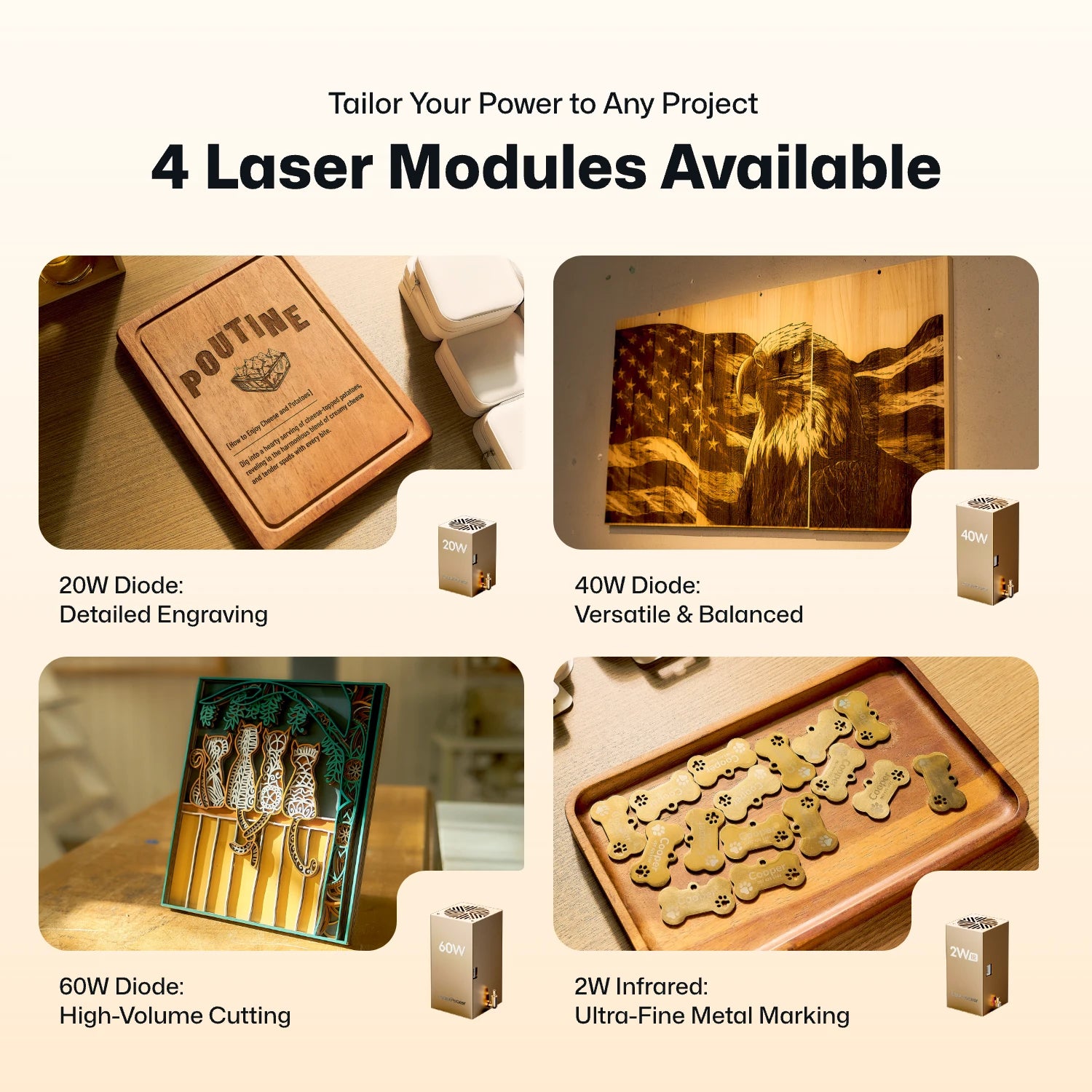
Reason #1: Interchangeable Modular System (20W, 40W, 60W & 2W IR)
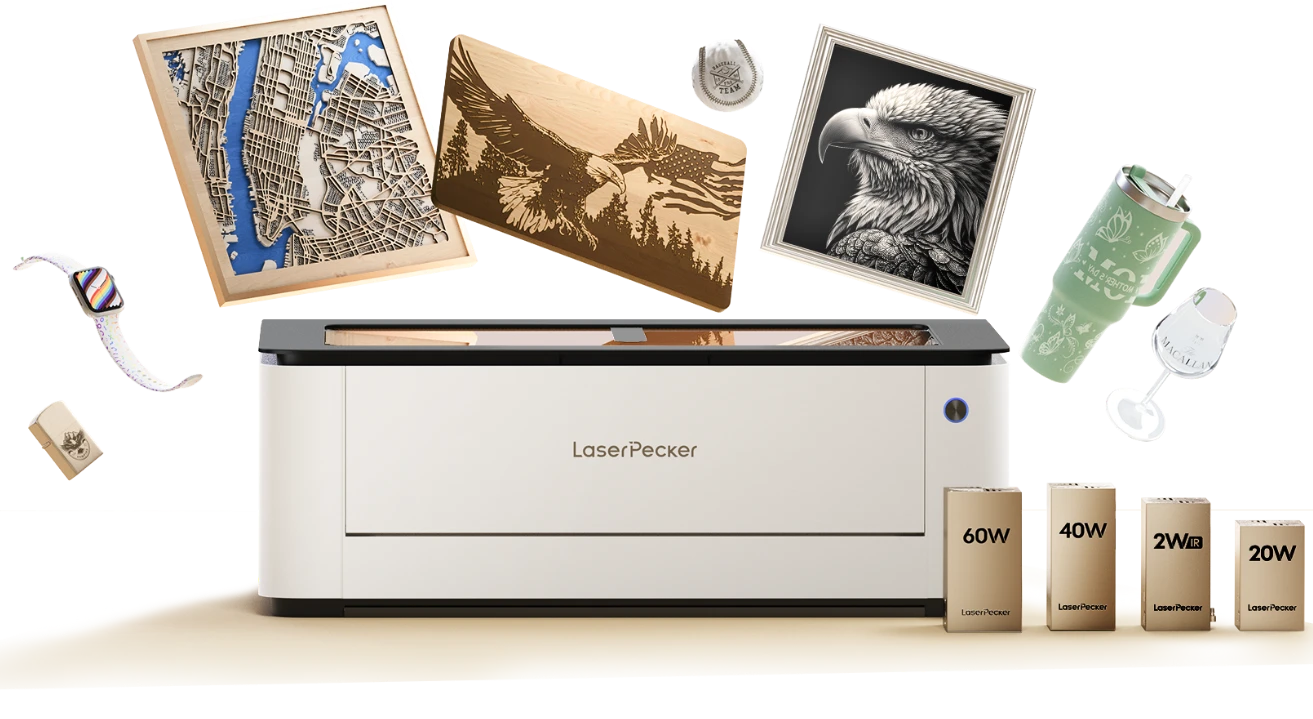
Unlike the Glowforge Plus, which uses a fixed CO2 laser system, the LX2 features a quick-swap modular design. Users can choose between 20W, 40W, or 60W blue diode laser modules for cutting and engraving wood, leather, and other common materials. For specialized projects, the 2W infrared laser module can engrave metals such as gold and silver, as well as many plastics that are difficult for traditional CO2 lasers to process.
This flexibility allows the LX2 to perform the work of multiple machines while maintaining a compact desktop footprint.
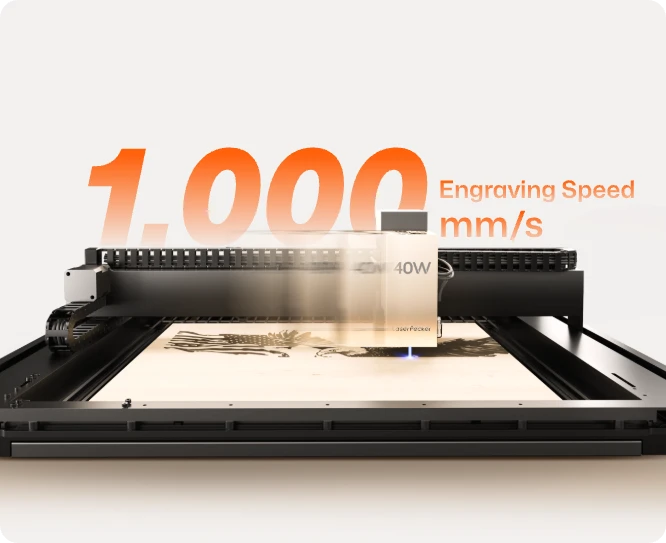
Reason #2: 1,000mm/s Engraving Speed and Faster Acceleration
The LX2 is designed for creators who value speed. With engraving speeds of up to 1,000mm/s and an impressive 10,000mm/s² acceleration, it can complete jobs significantly faster than many traditional desktop laser systems.
High acceleration is just as important as top speed. It allows the LX2 to reach its maximum speed faster and maintain momentum through frequent starts, stops, and direction changes. This is especially beneficial when engraving detailed graphics, text, or complex patterns with thousands of movement points.
The result is a faster, smoother workflow that can improve overall production efficiency by up to 35%, helping makers complete more projects in less time.
Reason #3: Offline Operation and Local Connectivity
One of the biggest differences between the LX2 and Glowforge Plus is workflow flexibility. While Glowforge relies heavily on cloud-based processing, the LX2 supports local operation through USB cable, Wi-Fi, and USB flash drives.
- Reliable USB Cable Connection: Connect the LX2 directly to your computer via USB for a stable, low-latency workflow. There's no need to rely on cloud servers, making it ideal for long engraving sessions and production work.
- Works Without Internet: Since jobs can be sent through a direct cable connection, you can continue working even if your Wi-Fi is unavailable or your internet service goes down.
- USB Flash Drive Support: Transfer files to a USB drive and run projects directly on the machine
- Multiple Connection Options: In addition to USB cable connectivity, the LX2 also supports Wi-Fi for convenient wireless operation when desired.
- No Cloud Dependence: Your files stay on your computer or local storage, giving you greater control over your workflow and eliminating concerns about server outages or cloud-processing delays.
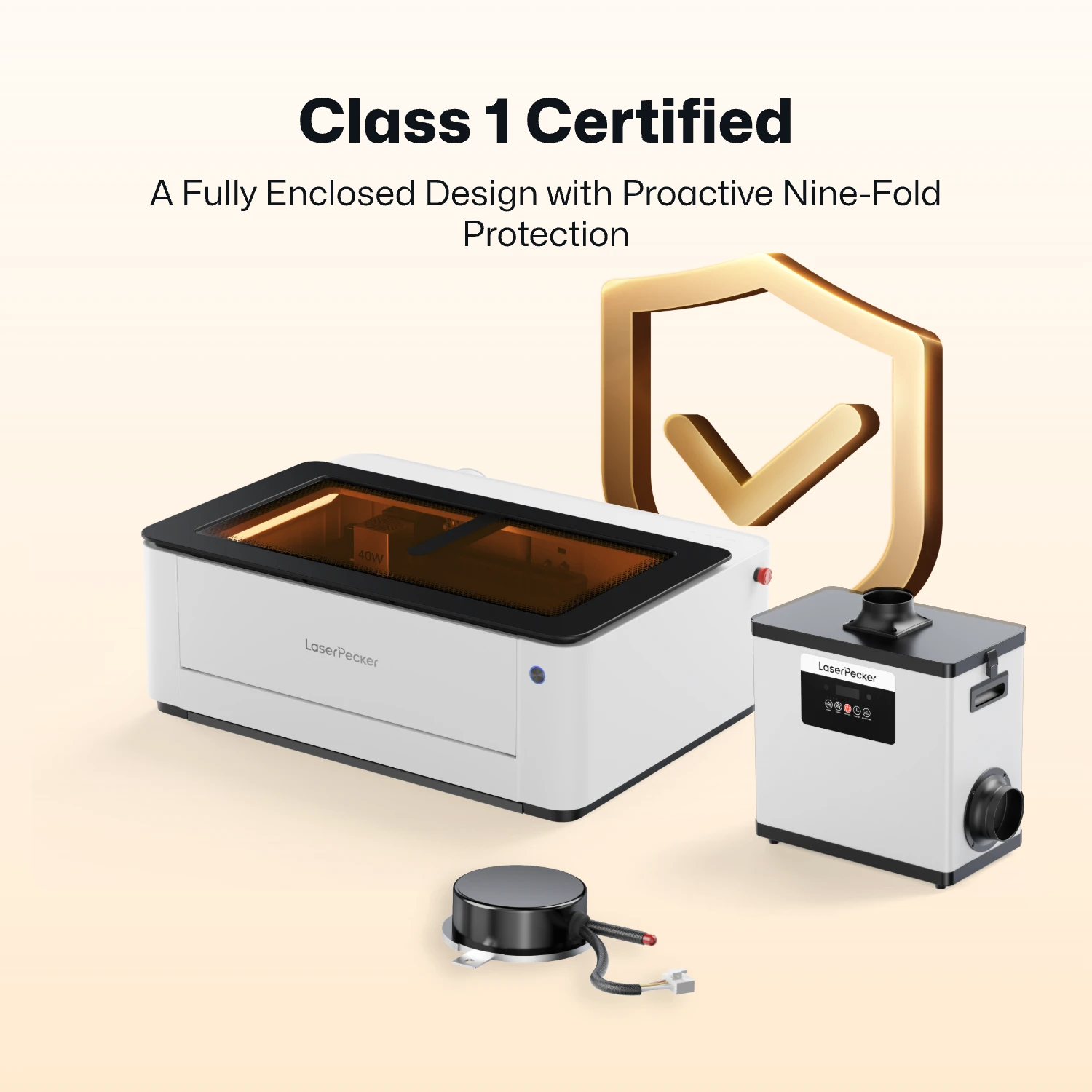
Reason #4: Integrated Class 1 Safety Protection
The LX2 is designed with safety in mind. Its enclosed Class 1 safety design helps contain laser radiation during operation, allowing users to work without wearing laser safety goggles under normal operating conditions.
An automatic safety stop pauses the machine when the protective cover is opened, providing additional protection for home workshops, classrooms, and shared creative spaces.
Reason #5: Expandable Work Area and Rotary Engraving Support
Although compact enough for desktop use, the LX2 can be expanded to handle larger and more diverse projects. By adding the riser base and rotary extension, users can engrave cylindrical and irregular objects such as tumblers, wine bottles, mugs, and baseball bats.
The motorized stand supports objects up to 150mm tall, giving creators more flexibility than many traditional enclosed laser systems.
For makers, small businesses, and creative professionals who want speed, flexibility, and material versatility, the LaserPecker LX2 offers a modern alternative to the Glowforge Plus without the limitations of a cloud-dependent workflow.
Part 3: Where Does Glowforge Plus Still Have an Edge?
While the LaserPecker LX2 offers greater flexibility, offline operation, faster motion performance, and modular upgrade options, the Glowforge Plus still has a few strengths that may make it a better fit for certain users.
Advantage #1: Better for Transparent Acrylic and Some CO2-Friendly Materials
The Glowforge Plus uses a 40W CO2 laser, which naturally works well with clear acrylic, glass engraving, rubber, fabric, and other materials that absorb the 10.6μm CO2 wavelength. If your business focuses heavily on acrylic signs, LED displays, rubber stamps, or fabric-based projects, a CO2 laser still offers some material advantages.
Advantage #2: Established User Community
After years on the market, Glowforge has built a large user community with extensive project libraries, tutorials, troubleshooting guides, and third-party resources. Beginners can often find answers quickly and learn from thousands of existing projects shared by other Glowforge owners.
That said, these advantages are most valuable for users who primarily work with CO2-friendly materials and prefer a simple, fixed workflow. For makers seeking higher speed, offline operation, metal engraving capabilities, upgrade flexibility, and a more future-proof platform, the LaserPecker LX2 remains the more versatile choice.
Part 4: Glowforge Plus vs LaserPecker LX2: Comparison Table
Now that we've covered the key limitations of the Glowforge Plus and the strengths of the LaserPecker LX2, let's compare the two machines side by side. The table below highlights the most important differences in speed, connectivity, material compatibility, upgradeability, workspace flexibility, and overall user experience.
While both machines are capable laser tools, they are designed with different priorities in mind. This comparison will help you quickly determine which one better fits your workflow and project needs.
| Glowforge Plus | LaserPecker LX2 | |
|---|---|---|
| Laser Type | 40W CO2 Laser | Swappable Modules: 20W / 40W / 60W Diode + 2W IR |
| Upgradeability | Fixed laser source; no swappable laser modules | Upgradeable with interchangeable laser modules |
| Offline Operation | Requires internet connection and cloud-based workflow | Supports local operation via USB cable and USB flash drive |
| Connectivity | Wi-Fi / Web App / Cloud Processing | USB Cable, Wi-Fi, and USB Flash Drive |
| Max Engraving Speed | Not publicly specified | Up to 1,000 mm/s |
| Max Acceleration | Not publicly specified | 10,000 mm/s² |
| Workspace | 19.5" × 11" / 495 × 279 mm | 19.7" × 12" / 500 × 305 mm |
| Max Cutting Thickness | Up to 13 mm; multiple passes may be required |
40W Module: 22 mm Paulownia Wood / 20 mm Acrylic 60W Module: 25 mm Wood / 30 mm Black Acrylic / 0.8 mm Stainless Steel |
| Bare Metal Engraving | Requires marking spray or coating | Direct metal engraving with 2W IR module |
| Camera System | Built-in lid camera | 12MP / 6K Camera + Point-to-Shape™ Positioning |
| Safety | Class 1 enclosed design | Class 1 enclosed design |
| Weight & Mobility | About 25 kg; large desktop unit | About 22.5 kg; more movable between fixed workspaces |
FAQ: Hot Questions about Glowforge Plus Alternatives
Q1: Is the Glowforge Plus still worth buying in 2026?
The answer depends on your needs. If your primary focus is cutting and engraving materials like wood, clear acrylic, leather, paper, and fabric, the Glowforge Plus is still a capable machine.
However, many newer laser systems now offer features that Glowforge lacks, such as offline operation, metal engraving capabilities, modular laser upgrades, and faster workflows. If flexibility and long-term expandability are important to you, it may be worth considering an alternative.
Q2: Do you need a dedicated workspace for the Glowforge Plus?
In most cases, yes. The Glowforge Plus weighs around 55 lbs (25 kg) and requires a stable work surface, proper ventilation, and enough surrounding space for safe operation.
While it can be moved when necessary, it is generally designed to stay in a permanent location. Users working in apartments, shared workspaces, or multipurpose rooms may prefer a more compact and flexible laser system.
Q3: Can the Glowforge Plus work without an internet connection?
No. The Glowforge Plus relies on a cloud-based workflow and requires an internet connection to process and run jobs.
If your internet connection is unavailable or the machine cannot connect to Glowforge's online platform, you may not be able to start new projects. Users who prefer complete local control often choose machines that support offline operation through USB or local software.
Q4: What is the biggest advantage of the LaserPecker LX2 over the Glowforge Plus?
The biggest advantage is flexibility. The LX2 offers offline operation, direct USB connectivity, swappable laser modules, faster motion performance, and support for both diode and infrared laser technologies.
This allows users to work with a wider range of materials and upgrade their machine over time without replacing the entire system.
Conclusion
The Glowforge Plus remains a capable laser cutter, especially for users who primarily work with wood, acrylic, leather, and other CO2-friendly materials. Its beginner-friendly software and enclosed design continue to make it a popular choice for hobbyists and first-time laser users.
However, the laser industry has evolved significantly. Features such as offline operation, direct USB connectivity, metal engraving, swappable laser modules, faster motion systems, and greater workflow flexibility are becoming increasingly important to modern makers and small businesses.
The LaserPecker LX2 was designed with those needs in mind. With its modular laser system, local connectivity options, high-speed performance, and broader material capabilities, it offers a more flexible platform that can grow alongside your projects.
If you're looking for a laser engraver that provides greater freedom, expandability, and long-term value, the LaserPecker LX2 is one of the strongest Glowforge Plus alternatives available today.


