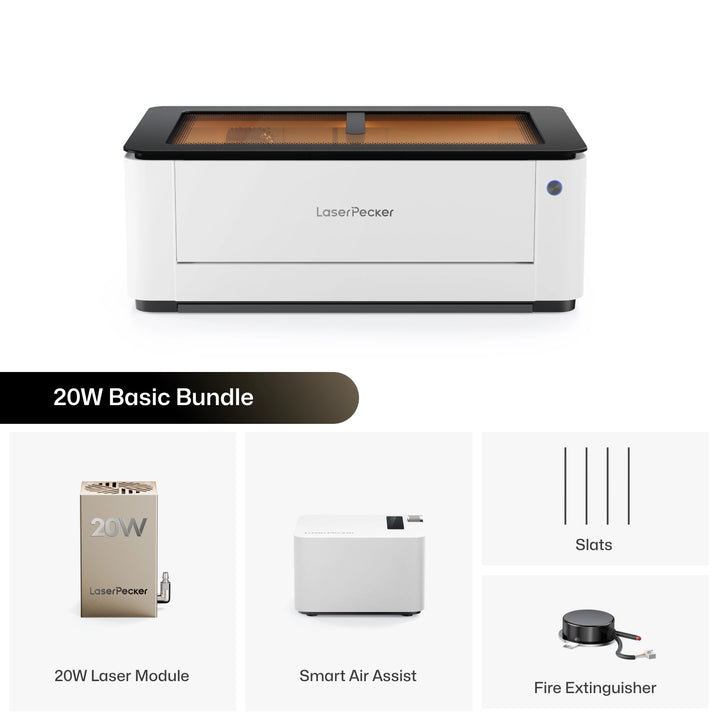
The Glowforge Pro has long been one of the most popular desktop laser cutters. But today, makers have many more choices than they did a few years ago. As technology has improved, more people are looking for machines that offer greater flexibility, lower maintenance, and support for a wider range of projects.
In this guide, we'll compare the Glowforge Pro with the LaserPecker LX2 and explain why many makers now see the LX2 as a strong alternative. We'll look at their key differences in performance, software, features, and overall value to help you decide which machine best fits your needs.

Part 1: What Makes People Look for a Glowforge Pro Alternative?
The Glowforge Pro is a well-known desktop laser cutter, but as the laser market has grown, so have users' expectations. Today, many makers want more flexibility, more features, and better value for their money.
Below are the main reasons why many people decide to look beyond the Glowforge Pro.
Reason #1: Limited Workflow Flexibility
Glowforge is designed to be simple and beginner-friendly, but its cloud-based workflow can become limiting as users take on more advanced projects. Because every job runs through Glowforge's web-based software, an internet connection is always required.
In the official Glowforge Community, one user asked whether the machine could be used without internet access. The answer was straightforward: "No, there's no way to use a Glowforge without an internet connection."

Reason #2: Higher Maintenance Compared with Modern Diode Laser
CO2 lasers are well known for their cutting performance, but they generally require more maintenance than modern diode laser cutters. The Glowforge Pro uses a sealed glass CO2 laser tube that gradually loses performance over time. In the official Glowforge Community, one user noted, "The laser tube is rated for two years of daily use..."
Routine maintenance is also part of normal ownership. Users should regularly clean key parts such as the laser lens, camera lens, crumb tray, and exhaust system to maintain engraving quality and machine performance.
By comparison, modern diode laser systems eliminate consumable CO2 laser tubes and typically require fewer routine maintenance tasks. Some diode laser modules are rated for 10,000+ hours of operation, making them an attractive option for home users, hobbyists, and small businesses seeking lower long-term maintenance requirements.
Reason #3: High Purchase Price
The Glowforge Pro is one of the most expensive desktop laser cutters in its class. With an official retail price of $5,995 for the standard Glowforge Pro (or $7,999 for the newer Glowforge Pro HD), it represents a significant investment for hobbyists and small business owners.
At these price points, many makers begin comparing it with newer laser systems that offer additional features, greater workflow flexibility, or broader material compatibility at a similar—or even lower—cost. As a result, value for money has become an increasingly important reason to consider a Glowforge Pro alternative.
Reason #4: No Native LightBurn Support
Another limitation is software compatibility. Glowforge does not support LightBurn, one of the industry's most widely used laser software platforms, according to the LightBurn development team. For makers who want offline operation, broader software compatibility, and greater control over their workflow, these limitations are often the first reason to start looking for a Glowforge Pro alternative.

Part 2: Why LaserPecker LX2 Is a Strong Alternative to Glowforge Pro
Once you compare the real workflow, upgrade options, material flexibility, and long-term ownership experience, the LaserPecker LX2 stands out as a modern alternative to the Glowforge Pro.
Reason #1: Lower Initial Investment
For many makers and small business owners, budget is one of the biggest factors when choosing a laser engraver. The LaserPecker LX2 starts at $1,949 for the 40W version, while the Glowforge Pro is priced at $5,995 and the newer Glowforge Pro HD at $7,999. This significantly lower entry price allows users to invest in accessories, materials, or business expansion instead of spending most of their budget on the machine itself.
For creators looking for professional engraving and cutting capabilities without a premium upfront cost, the LX2 offers a more affordable path into laser crafting and small-scale production.
Reason #2: No Recurring Subscription Fees for Core Features
Unlike Glowforge, which offers an optional Glowforge Premium subscription for advanced design tools and workflow features, the LaserPecker LX2 does not require a monthly subscription to access its core functionality. Glowforge Premium currently costs $20 per month or $240 per year, adding to the long-term cost of ownership.
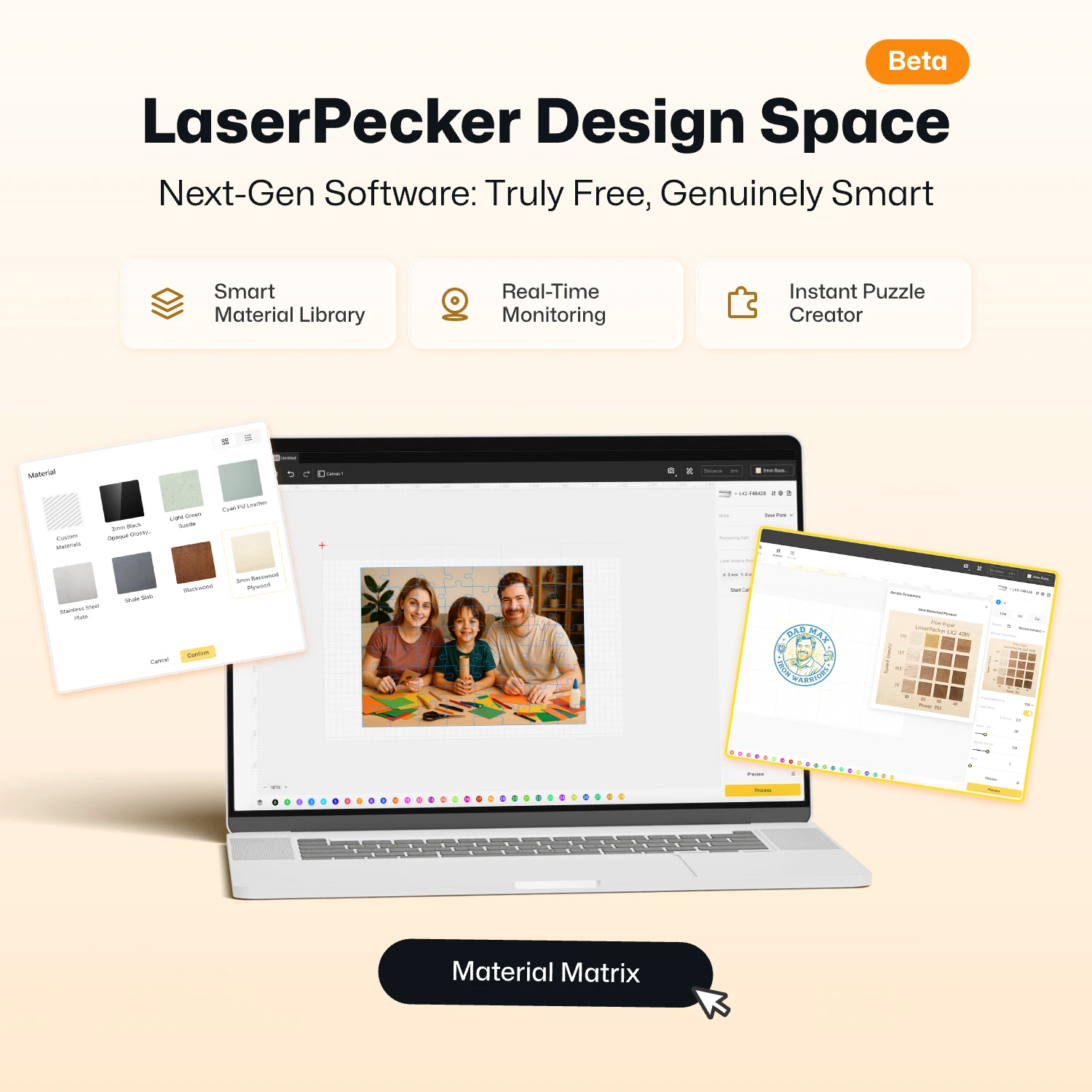
The LX2 offers a free smart software platform and downloadable free laser project for everyday engraving and cutting tasks, while users who prefer LightBurn only need to purchase a one-time license. With no recurring subscription required for core features, makers and small businesses benefit from more predictable long-term operating costs.
Reason #3: Native LightBurn Support
Unlike Glowforge, which relies on its own cloud-based software platform, the LaserPecker LX2 gives users greater flexibility by supporting LightBurn, one of the most widely used laser control software platforms. Users can design, edit, and control their projects locally without depending on an internet connection or cloud-based processing.
Reason #4: Swappable Laser Modules for More Types of Projects
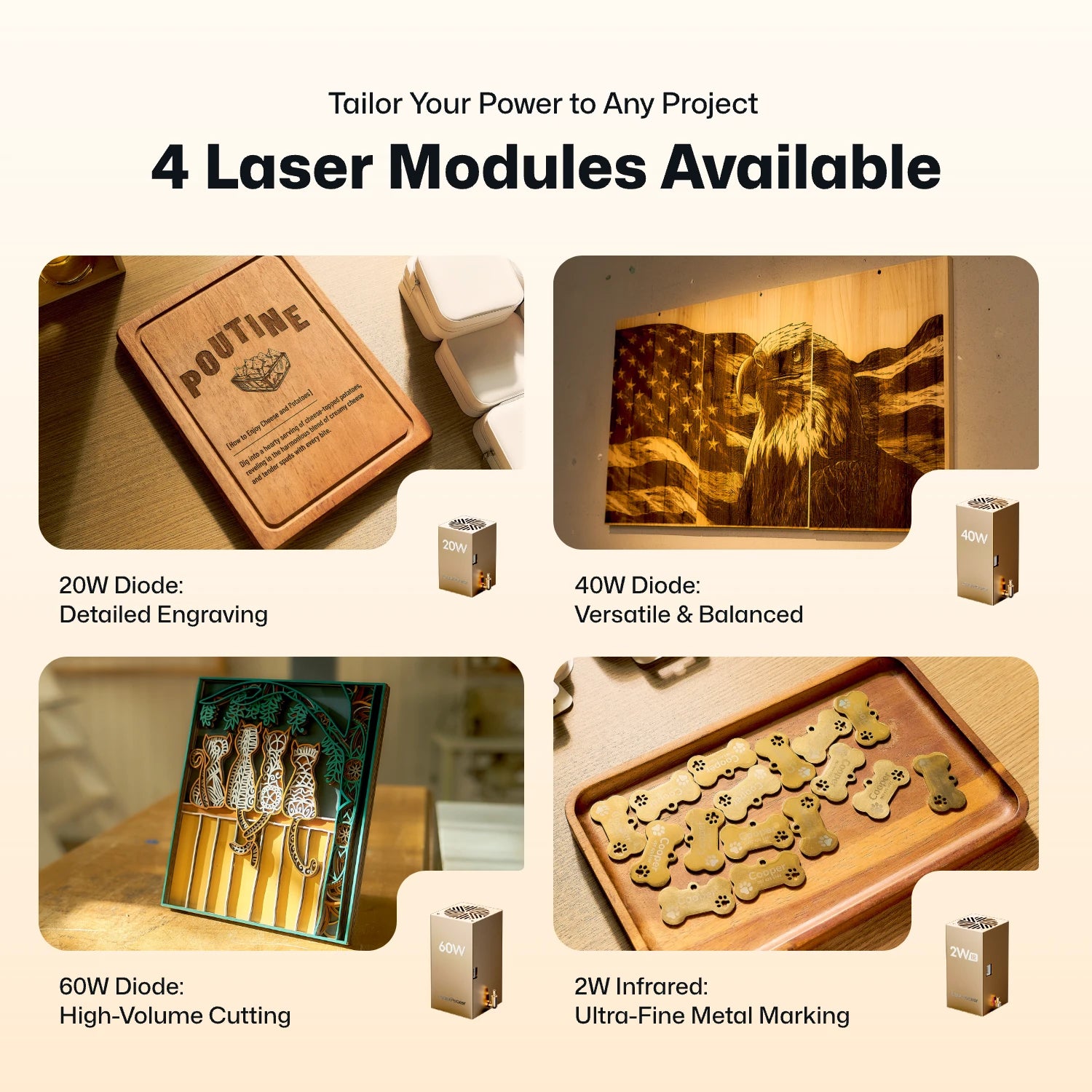
The Glowforge Pro is built around a fixed 45W CO2 laser, so its capabilities remain the same throughout the life of the machine. The LaserPecker LX2 takes a modular approach, allowing users to switch between 20W, 40W, and 60W diode laser modules, or install a 2W IR laser module for direct metal engraving and specialized materials.
As project requirements evolve, users can upgrade or change laser modules instead of investing in another machine. This modular design gives the LX2 a level of versatility and long-term expandability that fixed-laser systems cannot provide.
Reason #5: Rotary Engraving
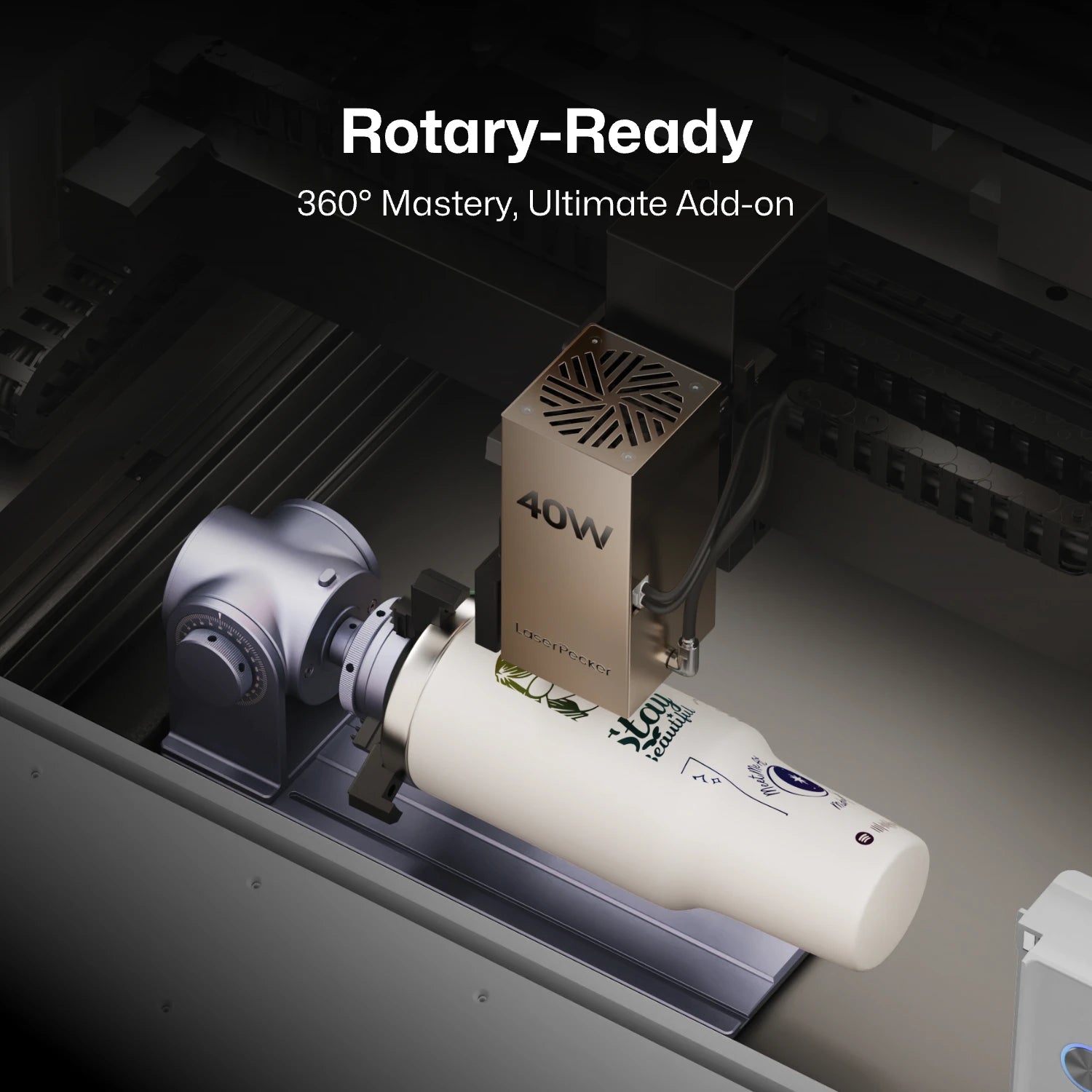
Unlike the Glowforge Pro, which is primarily designed for flat materials, the LaserPecker LX2 supports rotary engraving for cylindrical and curved objects. With the Rotary Extension, users can engrave tumblers, mugs, bottles, baseball bats, pens, and other round products with precision.
Whether you're creating personalized gifts or selling custom drinkware, rotary engraving opens up many projects that are difficult or impossible to complete on a traditional flatbed laser system.
Reason #6: Designed for Safer Everyday Use
Whether you're working at home, in a classroom, or in a shared workshop, safety is an important consideration. The LaserPecker LX2 is designed as a Class 1 laser safety product, allowing users to operate the machine under normal conditions without requiring laser safety goggles.
To help reduce potential risks during operation, the LX2 combines multiple built-in safety features, including:
- Automatic Safety Stop: Stops the laser if the protective cover is opened during operation.
- Tilt & Impact Protection: Automatically pauses the machine if it is bumped or tilted.
- Overheat Protection: Continuously monitors system temperature to help prevent overheating.
- Protective Shield: Helps contain laser exposure while maintaining easy access to the work area.
Part 3: Where the Glowforge Pro Still Has the Advantage
Although the LaserPecker LX2 offers stronger flexibility, modular laser options, offline workflow, and rotary engraving support, the Glowforge Pro still has advantages in several specific use cases.
Advantage #1: Better Performance on Clear Acrylic
The Glowforge Pro uses a 45W CO2 laser, which is naturally well suited for cutting and engraving clear, white, and translucent acrylic. This gives it an advantage over most diode laser systems, which typically work better on darker or opaque acrylic materials.
If your business focuses heavily on clear acrylic signs, wedding invitations, LED display panels, or transparent acrylic products, the Glowforge Pro may still offer a more direct workflow for those materials.
Advantage #2: Established User Community
Glowforge has been on the market for years and has built a large user community. Beginners can find project ideas, tutorials, troubleshooting tips, and material-setting discussions from other Glowforge owners.
This community support can be helpful for new users who want quick answers, shared project inspiration, and a familiar ecosystem.
Part 4: Glowforge Pro vs LaserPecker LX2: Quick Comparison Table
To help you quickly compare the two machines, the table below highlights their key differences in laser technology, performance, software, connectivity, material compatibility, and overall workflow.
| Glowforge Pro | LaserPecker LX2 | ||
|---|---|---|---|
| Laser Type | 45W CO2 laser | Modular diode laser + 1064nm IR laser | |
| Laser Power | 45W fixed CO2 | 20W / 40W / 60W diode + 2W IR | |
| Starting Price | $5,995 (45W) | $1,949 (40W) | |
| Max Engraving Speed | ≈300 mm/s* | Up to 1,000 mm/s | |
| Working Area | 11.5" × 20" (292 × 508 mm) |
19.7" × 12" (500 × 305 mm) |
|
| Rotary Support | No standard rotary workflow | Yes, supports 360° rotary engraving | |
| Bare Metal Engraving | Requires Laser Marking Spray | Direct Engraving with 2W IR Module | |
| Maintenance | Higher, due to CO2 tube system | Lower, durable diode-based system | |
| Connectivity | Requires internet connection | USB / Bluetooth / offline workflow | |
| Software | Cloud-based web app | LightBurn / LaserPecker Design Space / Mobile App | |
| Optional Subscription | Glowforge Premium ($20/month or $240/year) | None Required |
*Glowforge does not officially publish its maximum engraving speed. The value of approximately 300 mm/s is widely reported by independent reviewers and industry sources.
FAQ: Hot Questions about Glowforge Prolus Alternatives
Q1. Can Glowforge Pro use LightBurn?
No. The Glowforge Pro does not support LightBurn natively. Users need to use Glowforge's own web-based software, which requires an internet connection. The LaserPecker LX2, by contrast, supports LightBurn for a more flexible workflow.
Q2. Is a diode laser or a CO2 laser better for home projects?
It depends on your materials. CO2 lasers are strong for clear acrylic and many traditional craft materials. Diode lasers are often more compact, durable, and easier to maintain. A modular diode system like the LX2 also gives users more upgrade flexibility.
Q3. Can LaserPecker LX2 handle both engraving and cutting tasks?
Yes. The LaserPecker LX2 is designed for both high-speed engraving and precision cutting. Depending on the laser module installed, it can handle a wide range of materials for hobby, business, and production use.
- 20W Diode Module: Suitable for everyday engraving and light cutting on wood, leather, acrylic, paper, and other common materials.
- 40W Diode Module: Cuts up to 22 mm (0.87") Paulownia wood and 20 mm (0.79") black acrylic in a single pass.
- 60W Diode Module: Cuts up to 25 mm (0.98") wood, 30 mm (1.18") black acrylic, and 0.8 mm stainless steel.
- 2W IR Module: Designed for high-quality engraving on bare metals, precious metals, anodized aluminum, and many engineering plastics.
Conclusion
Choosing between the Glowforge Pro and the LaserPecker LX2 depends on how much flexibility you need. Glowforge offers a CO2 laser system that works well for many hobbyists. But the LX2 provides modular laser options, software freedom, rotary support, offline operation, and stronger long-term expandability.
If you need a machine that can grow with your business, support more project types, and fit a more flexible workspace, the LaserPecker LX2 is a strong Glowforge Pro alternative worth considering.