Business cards are still one of the best ways to make a strong first impression. However, traditional paper cards can easily be forgotten. Laser marking business cards gives your cards a premium appearance by creating permanent, high-precision designs on materials such as metal, wood, acrylic, and coated paper.
Whether you're creating cards for your own brand or offering a business card engraving service, laser engraving delivers a professional finish that stands out. The engraved design won't fade, peel, or smudge, making it ideal for businesses that want lasting quality.
In this beginner's guide, you'll learn everything you need to know about engraving business cards, including how laser engraving works, the best machines for different materials, essential safety tips, and a simple step-by-step process for creating professional results.

In this article:
- Part 1: The Overview of Business Cards Laser Engraving
- 1.1 What is Business Cards Laser Engraving
- 1.2 How Does Laser Engraving Work on Business Cards
- 1.3 What Engraving Machine Works Best for Business Cards Engraving
- Part 2: Why Use Laser Engraving for Business Cards
- Case Study: How to Laser Engrave Business Cards in 5 Steps💡
Part 1: The Overview of Business Cards Laser Engraving
1.1 What is Business Cards Laser Engraving?
Business cards laser engraving is the process of using a focused laser beam to etch text, logos, or intricate designs directly onto card materials such as wood, metal, plastic, or even premium paper stock. Unlike traditional printing, laser engraving removes the top layer of the material, leaving a permanent, precise, and tactile mark that feels unique and professional.

1.2 How Does Laser Engraving Work on Business Cards?
Laser engraving works by directing a concentrated laser beam onto the surface of the business card. The laser removes a thin layer of material or changes its color, producing sharp, highly detailed marks without using ink or chemicals.
Different materials produce different engraving effects:
- Wood and bamboo: Rich, dark engravings with natural contrast.
- Metal (stainless steel, aluminum, titanium): Clean, precise markings and, on some materials, attractive color changes.
- Acrylic and plastic: Frosted or semi-transparent engraved finishes.

1.3 Best Laser Engraving Machines for Business Cards
The most commonly used machines for business cards engraving are diode laser engravers, since they work well on materials like wood, acrylic, leather, and coated paper card and stainless steel, aluminum, or titanium business cards.
For home or small-scale business cards laser engraving project, business cards laser engraving machines like LP5 and LP4 are the good choice.
Recommended Portable Laser Engraver for Laser Engraving Business Cards: LaserPecker LP4
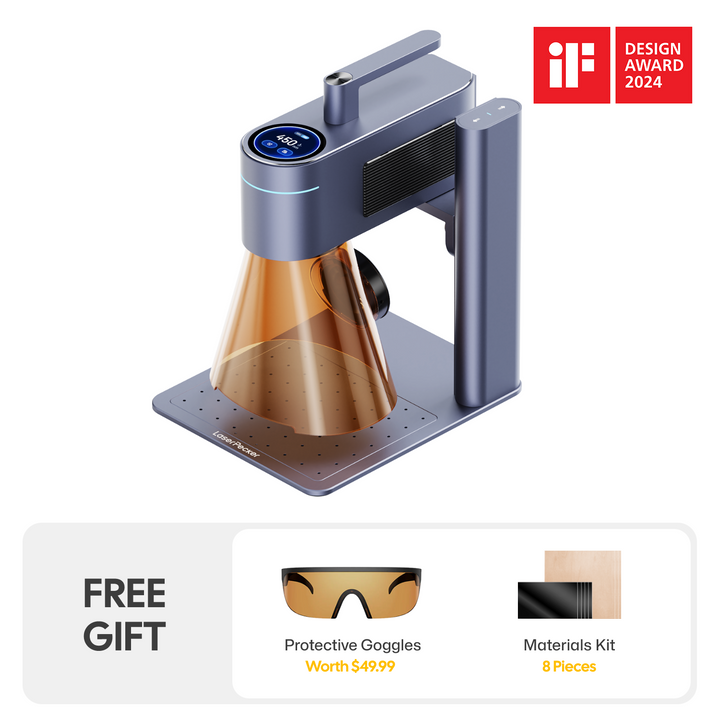
The LaserPecker LP4 is a compact dual-laser engraver designed for creating premium business cards, metal cards, plastic cards, wooden cards, and other personalized branding materials.
-
2W Infrared Laser for Metal Business Cards
The 2W infrared laser is optimized for engraving stainless steel, anodized aluminum, titanium, and other metal business cards with crisp, permanent markings. -
High Precision for Fine Text and QR Codes
The LP4 accurately engraves small text, logos, QR codes, contact information, and intricate graphics, making it ideal for professional business card customization. -
4,000 mm/s High-Speed Engraving
The high-speed galvo system allows users to quickly produce personalized business cards, making it suitable for custom orders and small-batch production. -
Slide Extension for Higher Batch Productivity
The optional the Slide Extension expands the engraving area, allowing users to process multiple business cards in one workflow. This reduces setup time and increases efficiency for custom orders and small business production.
Part 2: Why Use Laser Engraving for Business Cards?
More professionals and businesses are choosing laser engraving business cards because they offer a premium appearance, exceptional durability, and endless customization options. Compared with traditional printed cards, engraved cards create a stronger first impression and maintain their quality for years.
① Unique & Professional Appearance
Laser-engraved cards look sophisticated and tactile. The engraved texture creates a lasting impression that standard printed cards often lack. Whether it's a subtle logo, a bold name, or an intricate design, the results feel elegant and premium.
② High Precision & Customization
Laser engraving allows for ultra-fine details—from micro text to complex logos and patterns. You can personalize cards with names, QR codes, or even sequential numbering, making them both practical and artistic.
③ Durability & Longevity
Unlike ink or foil printing that can fade, scratch, or smudge, laser engravings are permanent. On materials like metal, wood, or acrylic, the design won't wear off, ensuring your business cards last longer in your clients' hands.
④ Compatible with Multiple Materials
Laser engraving works with a wide variety of business card materials, including:
- Stainless steel
- Anodized aluminum
- Wood and bamboo
- Acrylic
- Leather
- Coated cardstock
This flexibility allows you to create unique business cards that match your brand identity while offering customers more design choices.
⑤ Cost-Effective for Small Batches and Custom Orders
Because laser engraving doesn't require printing plates or expensive setup costs, it's ideal for producing one-off designs, limited editions, or personalized business cards. Whether you're making cards for yourself or running an engraving business card service, laser engraving provides an efficient way to produce premium-quality results.
Case Study: How to Laser Engrave Business Cards in 5 Steps💡
Preparation checklist for laser engraving Business Cards
- Engraving Material: Business Cards
- Engraving Machine: Diode Laser Engraver
- Engraving Design: Name, Logo, Images, Patterns, etc.
Can you engrave Business Cards? Yes! The process is straightforward. So, How long does it take to engrave Business Cards? Don't worry, just follow these 5 simple steps to get your laser engraved business cards in a few minutes!
Step 1: Create or Import Your Design
Start with the artwork, logo, or text you want to engrave. Use vector files (like SVG or AI) for the cleanest results, though most engraving software also supports images and text. Keep in mind that fine lines and high-contrast designs work best on anodized aluminum.
Step 2: Choose the Right Laser Engraver
Here, we recommend LaserPecker 4 (LP4), which comes with a 10W 450nm diode laser, 2W 1064nm IR laser and a speed of up to 4,000 mm/s, delivering excellent performance for business cards engraving.
Step 3: Position and Secure the Business Card
Place the business cards flat on the engraving bed. Use weights, tape, or clamps if needed to prevent movement. A stable, flat surface is crucial for consistent engraving depth and precision.
Step 4: Configure Your Engraving Settings
Use a LaserPecker graphic design app/software or third-party graphic design tools like photoshop to create or import the shape or design you want to engrave on the Business Cards's surface. Consider size, shape, and other details.
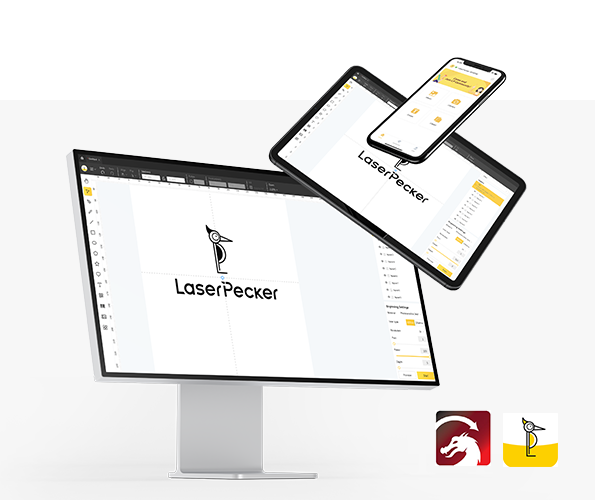
*You can also visit LaserPecker CraftZone for inspiration or to purchase files online.
Now, it's time to set the laser engraving machine parameters.
Firstly, Make sure your engraver is powered on, and then connect your laser engraver to your computer or mobile device using the appropriate interface (WiFi, USB, Bluetooth, etc.)
Secondly, Open the LaserPecker Design Space and load your design. (formats like JPG/PNG/G-Code/SVG etc are all acceptable)
Thirdly, place the items in the designated working area, turn on Preview Mode, and make sure the laser is properly focused.
Fourthly, check if your design fits properly on the business cards surface. If not, adjust its size and position to match the material's dimensions.

Finally, Access the software's laser settings to adjust parameters like power, speed, and resolution according to the business cards's properties and design intricacy. You might be wondering, "How much laser power is needed to engrave business cards?" Rest assured, I've got you covered!
For anodized aluminum business cards, a common starting point is:
- Laser: 2W 1064 nm IR
- Resolution: 2K
- Power: 100%
- Depth: 3%
- Passes: 1
When operating a laser engraving machine, it's advisable to wear goggles or use a laser protection cover to protect your eyes and body from potential harm, as the laser can pose risks.
Additionally, please be mindful that smoke or toxic gases may be emitted during the laser engraving process. Wearing a mask or employing an air purifier is essential for safety.
To explore other recommended laserpecker engraving and cutting parameters, refer to the settings table that applies to any laserpecker machines, including LP1, LP2, LP3, LP4 and LP5.
Step 5: Start Engraving Your Business Cards with Laser Now
Double-check everything to avoid mistakes. Then, hit the start button and watch the magic happen. The laser brings your design to life. Keep an eye on it, and you're all set!
Once complete, clean off any residue with a microfiber cloth or mild cleaner. Inspect the final cards to ensure sharpness and consistency across all pieces.
Conclusion
Laser engraving business cards is one of the best ways to create memorable, professional business cards that stand out from traditional printed designs. Whether you prefer the premium feel of stainless steel, the natural look of wood, or the modern style of acrylic, laser engraving delivers sharp, permanent results that reflect the quality of your brand.
With the right machine, suitable materials, and proper engraving settings, even beginners can produce high-quality cards in just a few minutes. As your skills improve, you can experiment with personalized designs, QR codes, logos, and unique finishes to create business cards that leave a lasting impression.
If you're ready to start laser marking business cards, begin with a simple design, test your settings on a spare card, and gradually refine your workflow. Whether you're creating cards for your own company or launching a business card engraving service, laser engraving offers an efficient, durable, and highly customizable solution.