The Gweike Cloud Pro 50W is a popular desktop CO2 laser cutter for cutting and engraving wood, acrylic, leather, and other common materials. It has become a popular choice for hobbyists, makers, and small businesses looking for an enclosed laser machine.
However, as more creators take on larger projects and work with a wider range of materials, many start looking for a machine that offers more flexibility, faster engraving, stronger cutting, direct metal engraving, and easier maintenance.
Here, we'll compare the Gweike Cloud Pro 50W with the LaserPecker LX2 and explain why the LX2 may be a better choice for creators who want a more versatile laser engraver and cutter.

Part 1: Why Do People Look for a Gweike Cloud Pro 50W Alternative?
The Gweike Cloud Pro 50W is a capable CO2 laser cutter, especially for wood, acrylic, leather, and other CO2-friendly materials. However, its traditional CO2 setup also comes with several limits that may not fit every modern maker or small business.
Limitation #1: Fixed CO2 Laser Tube with No Module Flexibility
The Gweike Cloud Pro uses a fixed 50W CO2 laser tube. While it works very well on wood, acrylic, leather, paper, and many other common materials, it is limited to a single laser wavelength.
Because the laser source cannot be changed or upgraded, users cannot switch to an infrared laser for direct metal engraving or choose different laser modules as their projects evolve. As many makers expand into jewelry, metal products, or industrial marking, they often need to purchase a separate machine instead of upgrading their existing one.
Limitation #2: Cannot Directly Engrave Bare Metal
Like most standard CO2 laser machines, the Gweike Cloud Pro cannot directly engrave bare metals such as stainless steel, aluminum, titanium, gold, or silver.
Instead, users typically need to apply a laser marking spray or coating before engraving. This adds extra material cost, preparation time, and cleanup, especially for makers who regularly personalize metal products.
This limitation has also been noted by reviewers. Hobby Laser Cutters pointed out that the machine offers "a little bit worse performance at engraving stainless steel directly," highlighting one of the common drawbacks of relying on a standard CO2 laser for metal engraving.

Source: Hobby Laser Cutters
Limitation #3: Slower Maximum Engraving Speed
The Gweike Cloud Pro has a maximum engraving speed of 600 mm/s. While this is fast enough for many everyday engraving projects, newer laser systems now offer even higher engraving speeds.
For makers who regularly handle batch production or large engraving jobs, higher engraving speeds and faster acceleration can help reduce production time and improve overall workflow efficiency.
Limitation #4: Camera Positioning May Need Manual Adjustment
The Gweike Cloud Pro uses a built-in 5MP wide-angle camera with an official AI visual positioning accuracy of up to ≤2 mm. While the camera helps preview layouts and place designs, it may not always provide the precision needed for very small objects or detailed repeat jobs.
Limitation #5: Heavier and Bulkier Design
The Gweike Cloud Pro weighs about 42.6 kg, or nearly 94 lbs. This makes it a heavy desktop machine that is difficult to move or reposition.
For home workshops, garages, studios, or shared workspaces, a bulky machine can reduce flexibility and require a more permanent setup.
Limitation #6: More Complex Long-Term Maintenance
Because the Gweike Cloud Pro is a CO2 laser machine, it requires more maintenance than many modern diode laser systems.
The CO2 laser tube has a limited lifespan and will eventually need replacement. The water-cooling system also requires regular attention, including coolant checks, water line care, and temperature management.
For busy users, these maintenance tasks can add downtime, extra cost, and more work over the life of the machine.
Part 2: Why Choose LaserPecker LX2 Instead of Gweike Cloud Pro 50W?
The LaserPecker LX2 is built for people who want a faster, more flexible, and easier-to-use laser machine. It supports different laser modules, can engrave directly on metal, offers higher precision, and has a lighter, more compact design.
Reason #1: Flexible Modular Laser Options
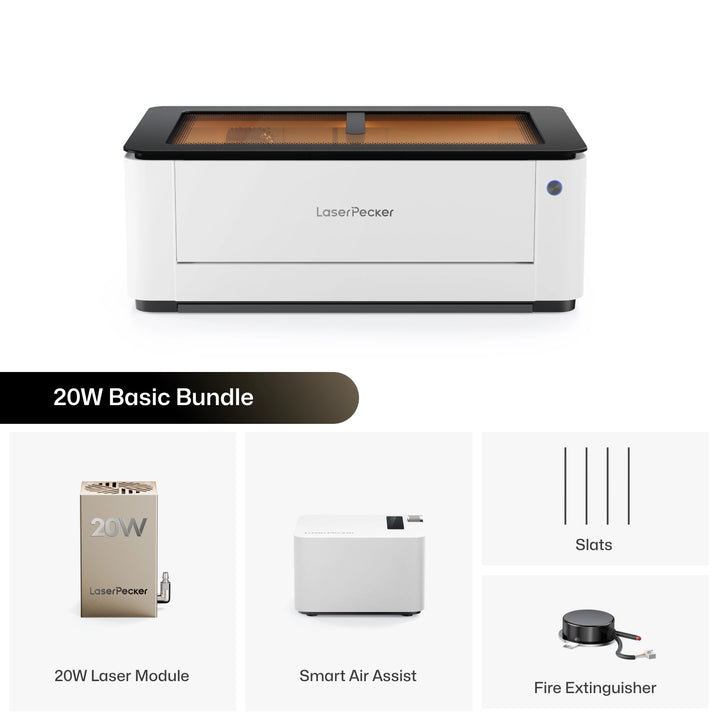
The LaserPecker LX2 supports different laser modules, including 20W, 40W, and 60W diode laser modules, plus a 2W infrared laser module.
- 20W Diode Module: Good for everyday engraving and light cutting.
- 40W Diode Module: Better for stronger cutting and higher output.
- 60W Diode Module: Designed for demanding cutting tasks.
- 2W IR Module: Used for direct engraving on metals and certain plastics.
This modular design gives users more flexibility than a fixed CO2 laser system.

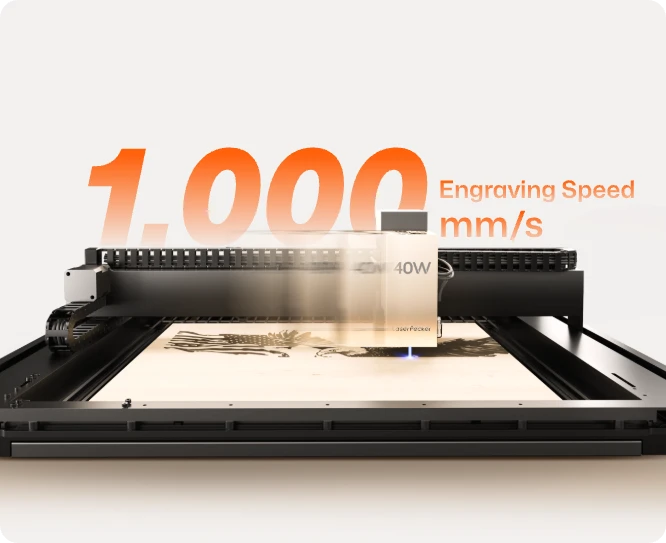
Reason #2: 67% Faster Engraving Speed
The LaserPecker LX2 reaches engraving speeds of up to 1,000 mm/s, compared with the Gweike Cloud Pro's 600 mm/s maximum speed.
That makes the LX2 about 67% faster in maximum engraving speed, helping users complete more projects in less time.
Reason #3: 12MP Camera with Dual Positioning System
The LX2 combines a 12MP / 6K camera with Point-to-Shape™ positioning. This gives users a clearer workspace preview and more accurate setup support.
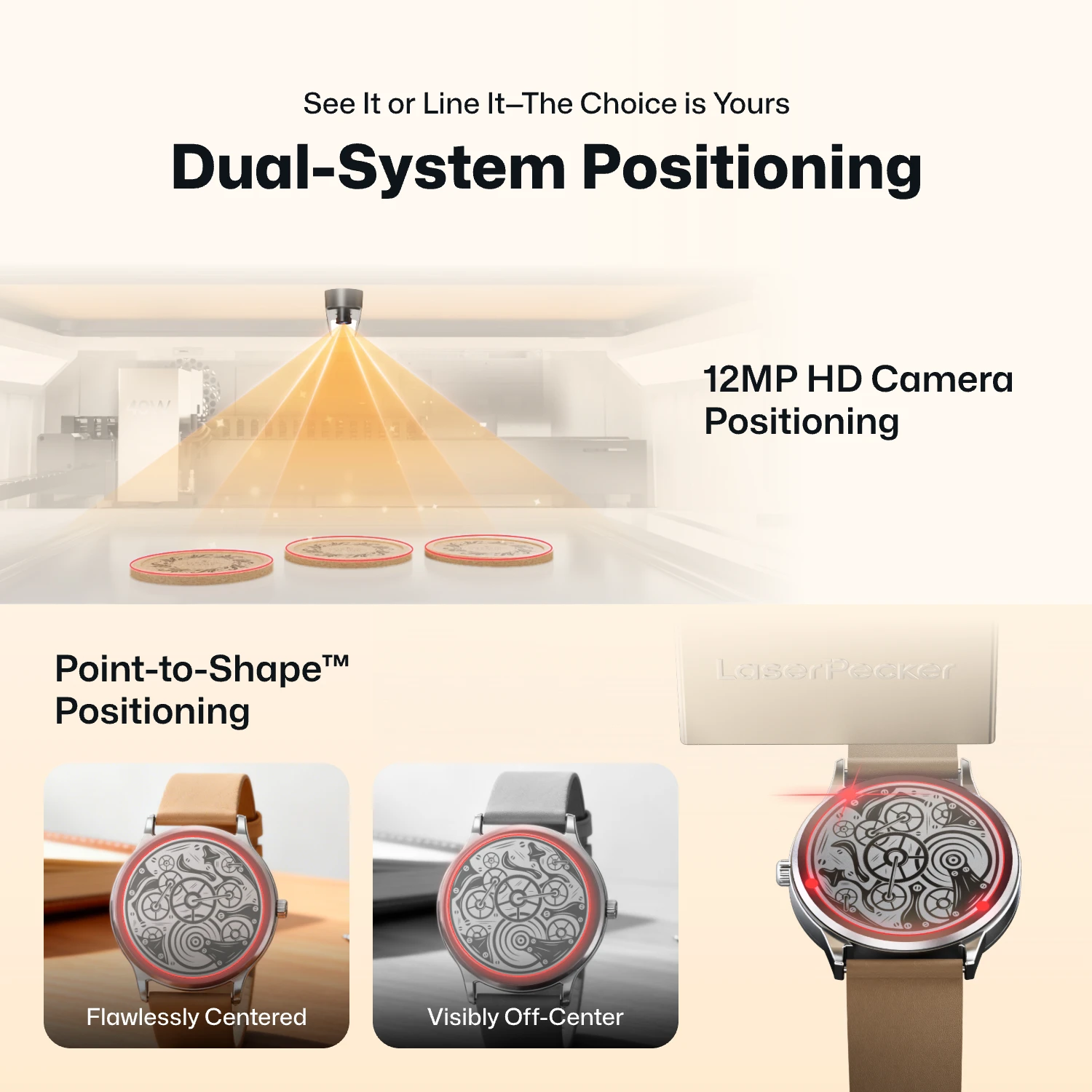
- 12MP Camera Positioning: The built-in ultra-wide camera provides a live preview of the entire workspace, allowing users to position artwork accurately before engraving begins.
- Smart Fill: Using the camera, the LX2 automatically detects multiple objects in the workspace and intelligently fills each one with the selected design, dramatically speeding up batch engraving.
- Remote Live View: The live camera feed lets users remotely monitor the workspace, verify positioning, and check engraving progress without standing next to the machine.
- Point-to-Shape™ Intelligent Probing: Instead of relying on visual recognition alone, the LX2 uses a mechanical probe to physically trace the outline of irregular objects. The detected shape is then imported into the software, allowing artwork to fit the object's exact contour with high precision.
The higher-resolution camera provides a clearer preview of your material, making it easier to position designs accurately before engraving. Whether you're engraving a single item or arranging multiple products for batch production, the system helps reduce setup time and improve positioning accuracy.
Compared with a single 5MP camera system, the LX2 provides better positioning assistance for small items, irregular shapes, and batch engraving projects.
Reason #4: Direct Metal Engraving with 2W IR Module
With the 2W infrared laser module, the LX2 can directly engrave many bare metals, including stainless steel, aluminum, copper, silver, titanium, and gold.
This allows users to make metal jewelry, pet tags, tools, business cards, tumblers, and other personalized metal products without using marking spray.
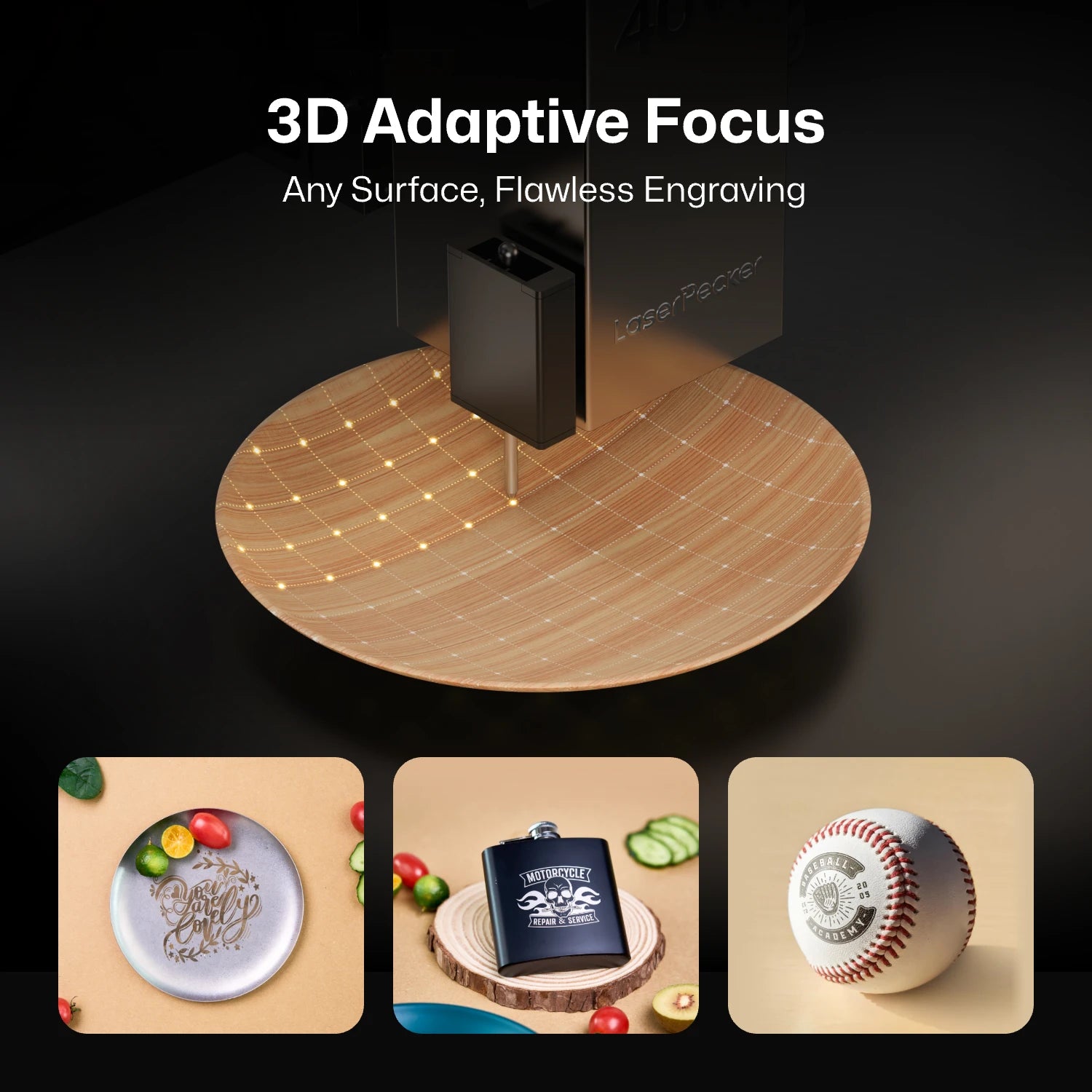
Reason #5: 3D Probe-Based Adaptive Focus
The LX2 includes 3D Surface Adaptive Auto-Focus. Its probe-based system can scan the surface of an object and adjust focus for curved, sloped, or uneven materials.
This is useful for creators who work with irregular objects, handmade pieces, or non-flat surfaces.
Reason #6: Nearly Half the Weight
The LaserPecker LX2 weighs about 22.5 kg, or around 49.6 lbs. Compared with the Gweike Cloud Pro at about 42.6 kg, the LX2 is much easier to move, store, and reposition.
For users working in home studios, garages, or flexible workspaces, the lighter design can be a major advantage.
Reason #7: Lower Maintenance Complexity
The LX2 uses solid-state diode and infrared laser modules. It does not require water cooling, CO2 tube replacement, or mirror alignment.
For small businesses and regular users, this means fewer maintenance tasks, less downtime, and lower long-term ownership complexity.
Part 3: Gweike Cloud Pro 50W vs LaserPecker LX2: Key Comparison Table
The table below compares the key differences between the Gweike Cloud Pro 50W and the LaserPecker LX2.
| Gweike Cloud Pro 50W | LaserPecker LX2 | |
|---|---|---|
| Laser Type | Glass CO2 Laser Tube | Modular Diode Laser + 2W Infrared (IR) Laser |
| Laser Output Power | 50W CO2 | 20W / 40W / 60W Diode + 2W IR |
| Working Area | 510 × 300 mm | 500 × 305 mm |
| Maximum Engraving Speed | Up to 600 mm/s | Up to 1,000 mm/s |
| Engraving Precision | 0.025 mm | ≤0.01 mm |
| Camera & Positioning |
5MP Wide-angle Camera AI Visual Positioning (≤2 mm) |
12MP / 6K Camera Point-to-Shape™ Intelligent Positioning |
| Autofocus |
AI Visual Autofocus Material Recognition Autofocus |
3D Surface Adaptive Auto-Focus |
| Cooling System | Built-in Water Cooling | Integrated Air Cooling |
| Max Cutting Capacity |
Up to 15 mm Basswood Up to 20 mm Black Acrylic Up to 12 mm MDF |
40W Module: 22 mm Paulownia Wood / 20 mm Acrylic 60W Module: 25 mm Wood / 30 mm Black Acrylic / 0.8 mm Stainless Steel |
| Bare Metal Engraving | Requires Laser Marking Spray or Coating | Direct Bare Metal Engraving with 2W IR Module |
| Safety | Class 1 Enclosed Design | Class 1 with 9-Stage Safety Protection |
| Software | Gweike Cloud + LightBurn | LaserPecker Design Space + LightBurn |
| Connectivity | USB, Wi-Fi | USB, Wi-Fi |
| Maintenance |
Water Cooling Mirror & Lens Cleaning CO2 Tube Replacement |
No Water Cooling No Mirror Alignment No CO2 Tube Replacement |
| Weight | 42.6 kg (93.9 lbs) | 22.5 kg (49.6 lbs) |
Part 4: Where the Gweike Cloud Pro 50W Still Has an Edge
While the LaserPecker LX2 offers greater flexibility, modular laser options, direct metal engraving, and lower maintenance, the Gweike Cloud Pro 50W still has several advantages for certain types of projects.
Advantage #1: Better for Clear Acrylic and Other CO2-Friendly Materials
The Gweike Cloud Pro's 50W CO2 laser naturally performs well on clear acrylic, glass, paper, leather, fabric, rubber, and many other materials that absorb the CO2 laser wavelength. If your business mainly focuses on acrylic signs, LED displays, rubber stamps, or fabric-based products, a CO2 laser can provide a more direct workflow.
Advantage #2: Larger Working Area
With a working area of 510 × 300 mm, the Gweike Cloud Pro offers slightly more workspace than the LaserPecker LX2's 500 × 305 mm. Although the difference is small, the additional width can be useful when engraving or cutting larger sheet materials with minimal repositioning.
Advantage #3: Proven CO2 Laser Platform
For makers who primarily work with traditional CO2-friendly materials and have no need for direct metal engraving or interchangeable laser modules, the Gweike Cloud Pro remains a capable and well-established desktop CO2 laser. Its enclosed design and dedicated CO2 workflow continue to make it a practical choice for fixed workshop environments.
FAQ: Common Questions About Gweike Cloud Pro 50W Alternatives
Q1: Can the LaserPecker LX2 replace a CO2 laser like the Gweike Cloud Pro?
It depends on the type of projects you make. If you mainly cut large sheets of clear acrylic, a CO2 laser like the Gweike Cloud Pro is still the better choice. But if you want more flexibility, direct metal engraving, faster engraving, strong cutting and lower maintenance, the LaserPecker LX2 is a strong alternative.
Q2: Does the LaserPecker LX2 need water cooling?
No. The LX2 uses diode and infrared laser modules, so it does not need water cooling, CO2 tube replacement, or mirror alignment. This makes routine maintenance much easier.
Q3: Does the LaserPecker LX2 work with LightBurn?
Yes. The LX2 works with both LightBurn and LaserPecker Design Space, giving you more options for designing and running your engraving projects.
Q4: Which machine is better for engraving metal?
If you want to engrave bare metal, the LaserPecker LX2 is the better choice. Its 2W infrared laser module can engrave many metals directly. The Gweike Cloud Pro usually needs a marking spray or coating before engraving bare metal.
Conclusion
Both the Gweike Cloud Pro 50W and the LaserPecker LX2 are capable laser machines, but they are designed for different needs.
The Gweike Cloud Pro is a good choice if you mainly cut and engrave wood, acrylic, leather, paper, and other CO2-friendly materials. However, its fixed CO2 laser, larger size, water-cooling system, and inability to directly engrave bare metal may not suit every user.
The LaserPecker LX2 offers a more flexible approach. It supports swappable laser modules, direct metal engraving, faster engraving speeds, strong cutting capability, high positioning accuracy, and lower maintenance. This makes it a practical choice for creators and small businesses that work with a wider variety of materials.
If you want a laser machine that can grow with your projects and requires less maintenance, the LaserPecker LX2 is a strong alternative to the Gweike Cloud Pro 50W.