


The xTool S1 is one of the most popular enclosed desktop laser engravers and cutters on the market. It offers a beginner-friendly design, interchangeable laser modules, and reliable engraving performance, making it a popular choice for hobbyists and small businesses.
However, as your projects become more demanding, you may start looking for more than just reliable engraving. Faster production, easier positioning, stronger cutting power, and greater flexibility can all become important as your business or creative projects grow.
If you're considering an alternative to the xTool S1, you're not alone. In this guide, we'll look at the common reasons users decide to upgrade, compare the xTool S1 with the LaserPecker LX2, and explain why the LX2 may be a better choice for creators who want a more efficient and future-ready workflow.

Part 1: Who Should Consider an xTool S1 Alternative?
The xTool S1 remains a popular enclosed desktop laser engraver, but every machine has its strengths and limitations. Depending on the materials you use, the projects you create, and how often you run your machine, you may eventually want features that go beyond what the S1 offers.
Below are the types of users who are most likely to benefit from exploring an xTool S1 alternative.
#1. People Who Want Visual Positioning
One of the biggest differences between desktop laser engravers today is how they position designs. Unlike many camera-equipped laser machines, the xTool S1 does not include a built-in overhead camera for visual positioning.
Instead, it uses xTool's Pin-Point™ Positioning system. Before each job, users must manually move the laser module to multiple reference points on the material, press the machine button to record each point, and repeat the process until the processing area is defined. While this manual workflow can provide accurate positioning, it requires several extra steps and does not offer a live camera preview of the workpiece.
Some users have also found this limitation noticeable in daily use. In one xTool user community discussion, a member commented, "The lack of camera on the S1 is the biggest challenge for me...", highlighting the convenience that a built-in camera can provide for visual positioning workflows.

#2. People Who Run Batch Production
For hobby projects, spending an extra minute on setup may not matter. But if you're producing dozens of personalized products every day, workflow efficiency quickly becomes just as important as engraving speed.
Although the xTool S1 supports batch processing, it does not include a built-in camera for visual positioning. This means users must manually define the processing area before engraving, making it more time-consuming to align multiple pre-cut items, irregular-shaped products, or materials that are placed differently between batches.
For Etsy sellers, small businesses, and production workshops, these manual positioning steps can add up over hundreds of jobs. Many users therefore prefer laser systems with integrated camera-based positioning, where multiple items can be visually arranged and positioned directly from a live workspace preview, reducing setup time and improving overall production efficiency.
#3. People Who Want More Powerful Laser Options
The xTool S1 offers four laser module options, including 10W, 20W, 40W, and a 2W infrared module. For many users, these cover everyday engraving and cutting needs.
However, makers who expect their projects to become more demanding may eventually want higher-power options. At the moment, the S1 platform does not offer a 60W diode laser module, meaning users who need significantly stronger cutting performance may eventually have to move to a different machine rather than simply upgrading their existing one.
#4. People Who Need Faster Engraving Speed
For hobby projects, engraving speed may not be a major concern. But for Etsy sellers, small businesses, and users producing batches of personalized products, every minute counts.
The xTool S1 has a maximum engraving speed of 600 mm/s, which is suitable for many everyday applications. However, some users have commented that larger or highly detailed engraving jobs can take longer than expected. In one Reddit discussion, an S1 owner wrote, "It's rather slow. Takes about an hour for each project."

If you're regularly producing coasters, signs, wedding favors, or other custom products, a machine with a higher maximum speed and faster overall workflow can help increase daily output and reduce production time.
#5. People Who Want Higher Cutting Efficiency
The xTool S1 performs well for everyday engraving and cutting tasks. However, users who regularly work with thick wood or acrylic may find themselves relying on slower cutting speeds or multiple passes to achieve clean results.
According to xTool's official specifications, the 40W S1 module can cut up to 18mm basswood and approximately 15mm opaque acrylic in a single pass under recommended conditions. In community discussions, some users also report needing additional passes or troubleshooting settings when cutting thicker plywood and hardwood to achieve complete cuts.
For makers producing signs, furniture parts, layered artwork, or thicker acrylic products, greater single-pass cutting capacity can improve production efficiency, reduce edge charring, and minimize post-processing.
Part 2: Why LaserPecker LX2 Is Worth Considering?
The LaserPecker LX2 is designed for makers who want faster setup, stronger cutting capability, and more room to expand. Here are the key reasons it stands out as an xTool S1 alternative.
Reason #1: Smarter Positioning for Faster Production
The LaserPecker LX2 combines a 12MP ultra-wide camera with Point-to-Shape™ intelligent probing to simplify project setup and improve engraving accuracy. Together, these technologies reduce manual alignment, shorten setup time, and make batch production much more efficient.
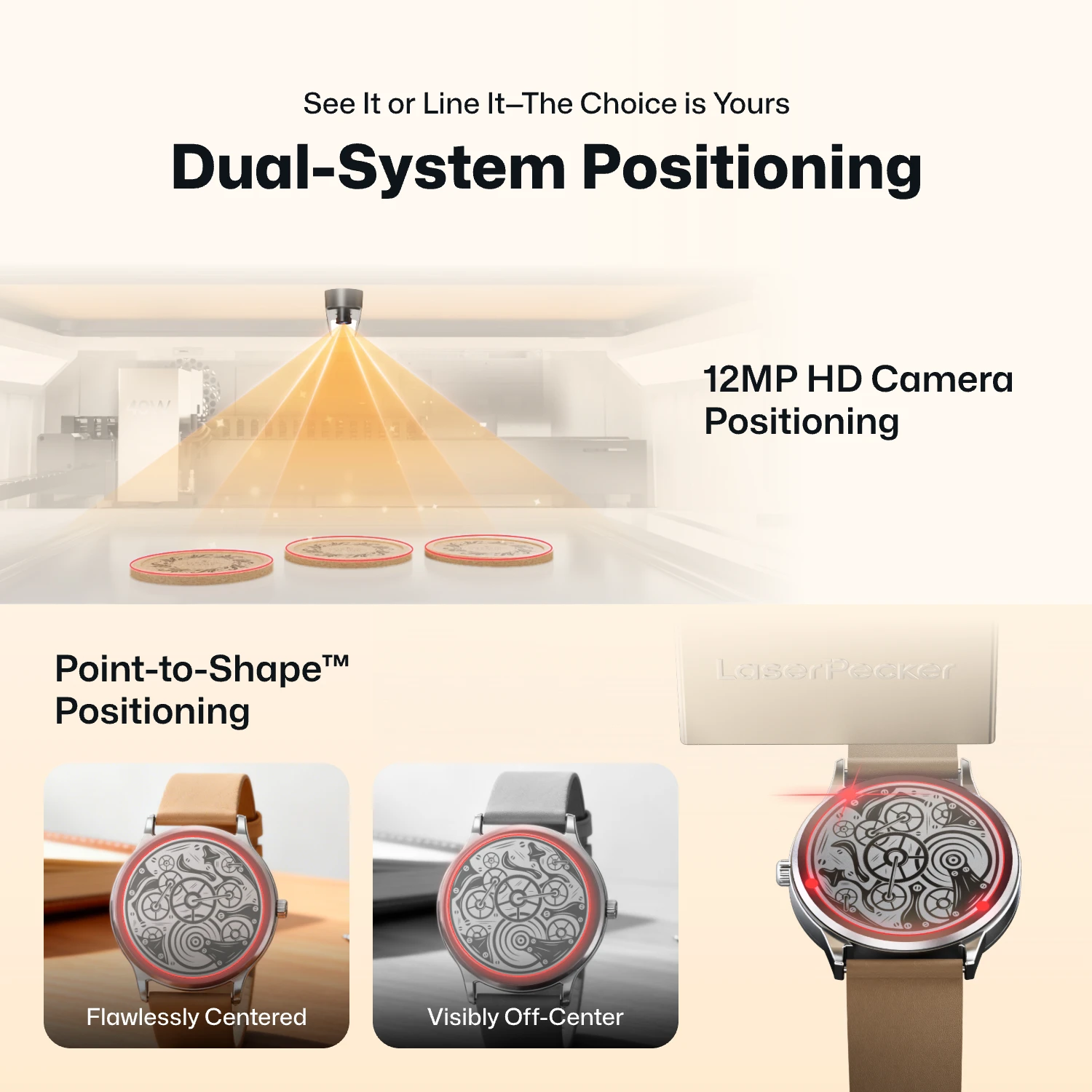
- 12MP Camera Positioning: The built-in ultra-wide camera provides a live preview of the entire workspace, allowing users to position artwork accurately before engraving begins.
- Smart Fill: Using the camera, the LX2 automatically detects multiple objects in the workspace and intelligently fills each one with the selected design, dramatically speeding up batch engraving.
- Remote Live View: The live camera feed lets users remotely monitor the workspace, verify positioning, and check engraving progress without standing next to the machine.
- Point-to-Shape™ Intelligent Probing: Instead of relying on visual recognition alone, the LX2 uses a mechanical probe to physically trace the outline of irregular objects. The detected shape is then imported into the software, allowing artwork to fit the object's exact contour with high precision.
Whether you're engraving keychains, leather patches, acrylic blanks, wooden signs, or other personalized products, the combination of camera-assisted positioning and Point-to-Shape™ helps reduce setup time, improve placement accuracy, and increase overall production efficiency.
Reason #2: 20W, 40W, 60W and 2W IR Laser Modules
The LX2 is built around a modular laser system. Users can choose from 20W, 40W, and 60W diode laser modules for engraving and cutting wood, leather, acrylic, paper, and other common materials.
For metal and plastic engraving, the 2W IR module expands the machine’s material range, making it suitable for jewelry, metal tags, coated products, tools, and personalized gifts.

Reason #3: Stronger Single-Pass Cutting Performance
For many makers, laser power isn't just about cutting thicker materials—it's about finishing jobs faster and producing cleaner results. Higher cutting capacity often means fewer passes, less edge charring, and less time spent on post-processing.
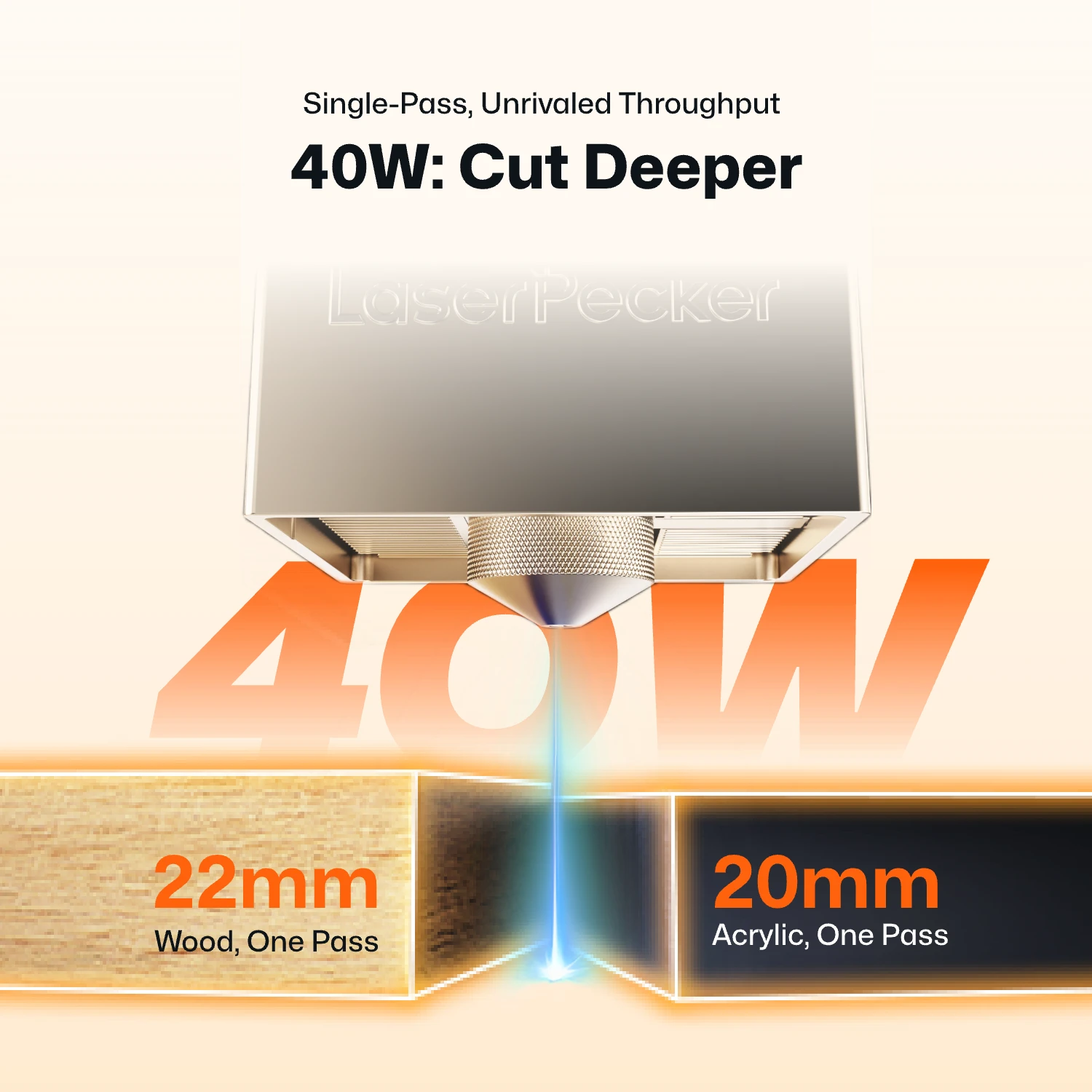
The LaserPecker LX2 is designed for users who regularly work with thicker materials. Its 40W module can cut up to 22mm Paulownia wood (or 20mm basswood ) and 20mm black acrylic in a single pass. For even more demanding projects, the optional 60W module cuts up to 25mm wood, 30mm black acrylic, and 0.8mm stainless steel.
By comparison, the xTool S1's 40W module is officially rated to cut up to 18mm basswood and approximately 15mm opaque acrylic in a single pass under recommended conditions. While this is sufficient for many everyday projects, makers who frequently produce thick wooden signs, layered décor, furniture components, or acrylic products may benefit from the LX2's higher cutting capacity and expanded module options.
Reason #4: Faster 1,000 mm/s Engraving Speed
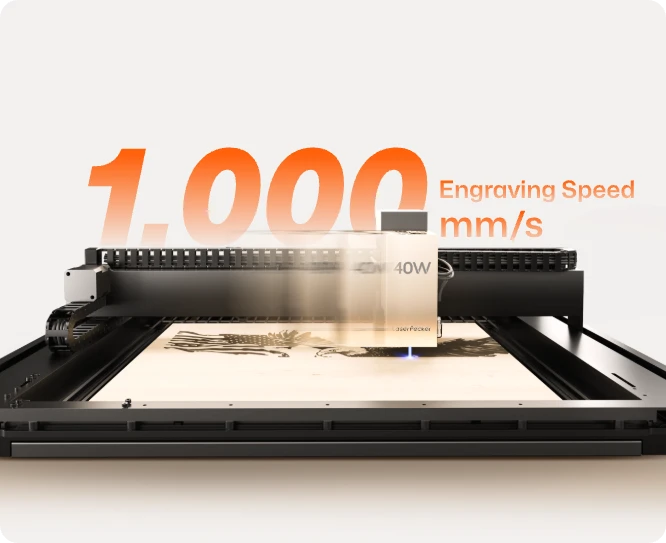
The LX2 reaches up to 1,000 mm/s engraving speed and uses 10,000 mm/s² acceleration. This allows the machine to move quickly and reach full speed faster, especially during complex engraving paths with many direction changes.
For batch production, this speed advantage can make a big difference. Whether you're engraving leather patches, product tags, signs, or custom gifts, faster motion helps reduce waiting time and improve daily output.
Reason #5: Engrave Curved and Uneven Surfaces with 3D Adaptive Focus
Most desktop laser engravers are designed for flat materials, making it difficult to achieve consistent results on curved or uneven surfaces. The LaserPecker LX2 overcomes this limitation with its 3D Surface Adaptive Auto-Focus, allowing users to engrave complex three-dimensional objects with greater accuracy and consistency.
Using a mechanical probe, the LX2 automatically scans the surface of the object and creates a precise 3D height map. During engraving, the machine continuously adjusts the laser height in real time to maintain optimal focus across curves, slopes, and uneven surfaces—eliminating much of the manual focusing and trial-and-error typically required.
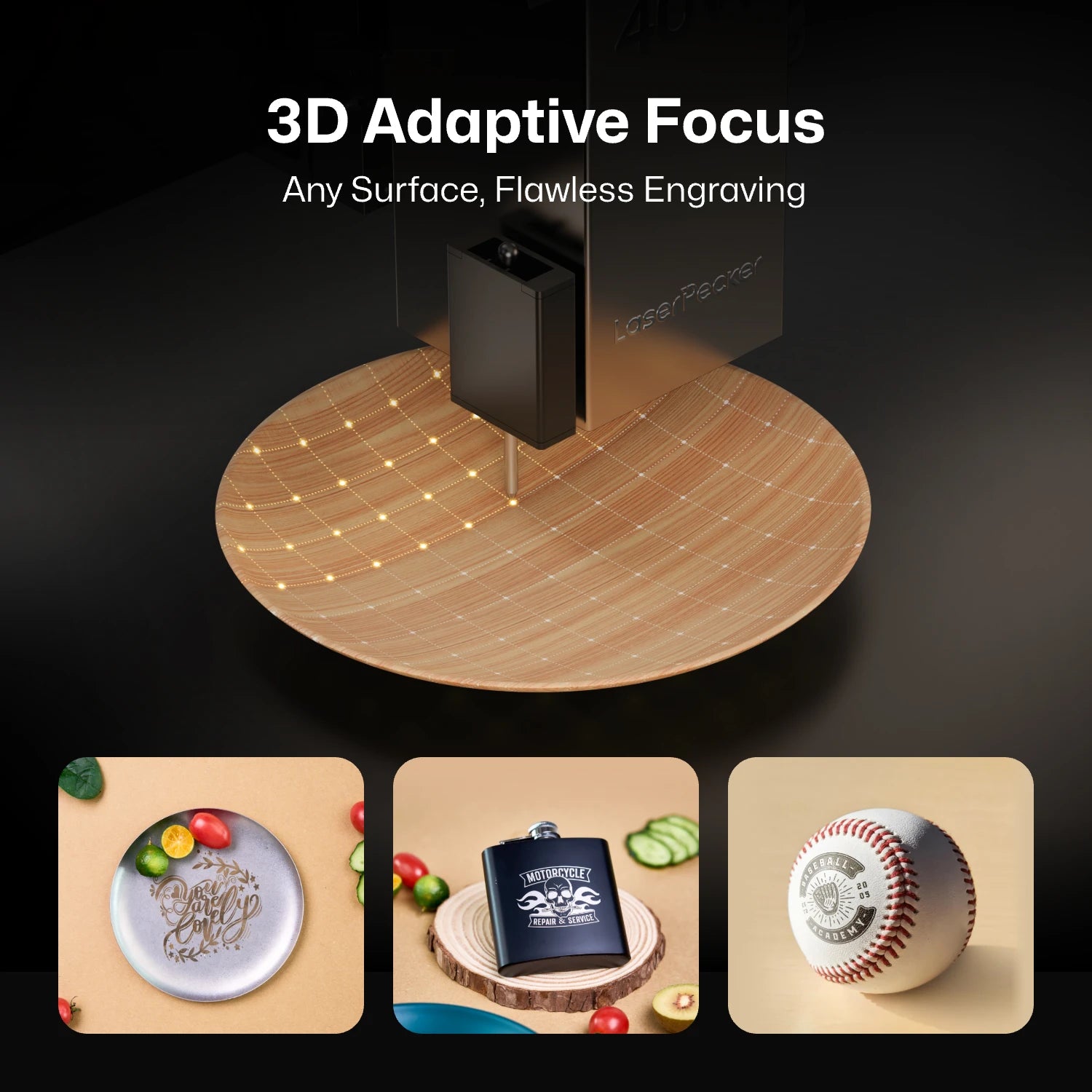
This makes it possible to engrave products such as wooden bowls, curved drinkware, glassware, sculptural objects, carved wood, and other irregularly shaped items with professional-quality results, expanding the range of projects that makers and small businesses can confidently take on.
Part 3: xTool S1 vs LaserPecker LX2: Key Comparison Table
Both the xTool S1 and the LaserPecker LX2 are capable desktop laser systems, but they are designed with different priorities.
The table below compares their key specifications, workflow features, and cutting capabilities to help you quickly identify which machine best matches your needs.
| xTool S1 | LaserPecker LX2 | |
|---|---|---|
| Machine Type | Class 1 Fully Enclosed Desktop Laser Cutter and Engraver | Class 1 Fully Enclosed Desktop Laser Cutter and Engraver |
| Laser Module Options | 10W / 20W / 40W Diode 2W IR Module |
20W / 40W / 60W Diode 2W IR Module |
| Built-in Camera | No | 12MP / 6K Camera |
| Positioning System | Pin-Point™ Positioning (Manual Twin-Point Positioning) |
Point-to-Shape™ Positioning Visual Positioning with 12MP / 6K Camera |
| Maximum Engraving Speed | Up to 600 mm/s | Up to 1,000 mm/s |
| Maximum Acceleration | Not Publicly Specified | 10,000 mm/s² |
| Work Area | 498 × 319 mm | 500 × 305 mm |
| Single-Pass Cutting Capability |
40W Module • 18mm Basswood • 15mm Opaque Acrylic |
40W Module • 22mm Paulownia Wood • 20mm Acrylic 60W Module • 25mm Wood • 30mm Black Acrylic • 0.8mm Stainless Steel |
| Maximum Working Height |
Standard: 42mm Up to 133.5mm (with Riser Base) |
Standard: 45mm Up to 150mm (with Riser Base) |
| Rotary Engraving | Supported with RA2 Pro | Supported with Rotary Extension |
| Software | xTool Creative Space LightBurn |
LaserPecker Design Space LightBurn |
| Connection | USB / Wi-Fi | USB / Wi-Fi / USB Flash Drive |
FAQ: Hot Questions About xTool S1 Alternatives
Q1: Is the xTool S1 still worth buying?
Yes. The xTool S1 is a capable enclosed laser engraver and cutter that offers good engraving quality, interchangeable laser modules, and a beginner-friendly workflow. If you mainly engrave flat materials such as wood, leather, or acrylic, it remains a solid choice.
However, if you want features like camera-based positioning, faster engraving speeds, stronger cutting performance, or a 60W laser option, it may be worth considering an alternative.
Q2: Which machine is better for small businesses?
Both machines can be used for small businesses, but they suit different types of work. The xTool S1 is a good option for general engraving and cutting, while the LaserPecker LX2 is better suited for businesses that handle batch production, thicker materials, or a wider variety of custom products.
Q3: Can both machines engrave metal?
Yes. Both machines offer a 2W infrared laser module for engraving many types of metal, including stainless steel, aluminum, gold, silver, and other metal surfaces. The standard diode laser modules are mainly intended for wood, leather, acrylic, and other non-metal materials.
Conclusion
The xTool S1 is a capable desktop laser engraver and cutter that works well for many hobbyists and small businesses. If your projects mainly involve standard engraving and cutting on flat materials, it remains a solid option.
However, if you want a machine that can grow with your projects, the LaserPecker LX2 offers more flexibility. Its built-in camera makes positioning easier, the modular laser system gives you more power options, and the higher cutting capability and faster engraving speed help improve productivity as your workload increases.
Whether you're creating custom gifts, running an Etsy shop, or expanding into small-batch production, the LaserPecker LX2 provides a more versatile platform that can adapt to your future needs without requiring you to replace your entire machine.


