


Laser cutting cloth has become a practical solution for makers, small businesses, fashion designers, and hobbyists who need accurate fabric cutting with minimal manual effort.
Unlike scissors or rotary cutters, a laser uses a focused beam of light to cut cloth without direct contact, helping create consistent shapes and intricate patterns that are difficult to achieve by hand.
In this guide, you'll learn how laser cutting cloth works, which cloth materials are most suitable, how to choose the right machine for your needs, and the essential steps to achieve clean, reliable results.

In this article:
Part 1:The Overview of Laser Cutting Cloth
1.1 What Is Laser Cutting Cloth?
Laser cutting cloth is the process of using a focused laser beam to separate cloth materials into precise shapes and patterns. Instead of relying on physical blades, the laser follows a digital design file, allowing users to create everything from simple geometric pieces to highly detailed decorative designs with excellent repeatability.
This method is commonly used for clothing, quilting templates, appliqué, embroidery patches, felt crafts, home textiles, and custom cloth products.
Because the cutting path is digitally controlled, users can easily resize, duplicate, or modify designs without changing physical tools, making laser cutting cloth suitable for both one-off custom work and repeated production.

1.2 How Does Laser Cutting Work on Cloth?
A laser cutter converts electrical energy into a concentrated beam of light that heats the fabric along a programmed cutting path. As the material absorbs the laser energy, it separates cleanly while the machine follows the design with high precision. Since there is no physical blade touching the cloth, there is less mechanical distortion, which is especially helpful when working with lightweight or delicate fabrics.
Different cloth materials respond differently to laser energy. Synthetic materials such as polyester often develop lightly sealed edges during cutting, while natural fibers like cotton typically require carefully adjusted power and speed settings to produce clean results without excessive scorching. Choosing appropriate settings and testing on scrap material helps ensure consistent, high-quality cuts across different cloth types.
Part 2: Best Cloth Materials for Laser Cutting
Not every type of cloth reacts to a laser in the same way. Fiber composition, cloth thickness, weave, and surface finish all influence cutting quality, edge appearance, and the amount of heat generated during the process.
Before starting a project, it's helpful to understand how different materials behave so you can choose suitable settings and achieve cleaner, more consistent results.
Cotton
Cotton is one of the most widely used natural cloth materials for laser cutting because it's easy to source and suitable for many craft and sewing projects. It works well for quilting pieces, appliqué, home décor, and lightweight garment components. Since cotton doesn't melt like synthetic fibers, the cut edges remain natural rather than sealed.
Because cotton is heat-sensitive, excessive laser power may leave brown marks or scorch the cloth. Using lower power, higher cutting speeds, and performing a small test cut before the full project can help produce cleaner edges while minimizing discoloration.
Polyester
Polyester is one of the easiest fabrics to laser cut because its synthetic fibers respond well to a focused laser beam. During cutting, the heat slightly melts the material along the edge, helping reduce fraying and producing a cleaner finish without additional edge treatment in many cases.
This makes polyester suitable for sportswear, custom patches, banners, event decorations, and fashion accessories. Since different polyester cloth blends vary in composition, it's still recommended to test your settings on a scrap piece before cutting the final design.
Felt
Felt is a popular material for laser-cut crafts thanks to its stable structure and ease of handling. It is commonly used for ornaments, educational materials, costume accessories, toys, and decorative projects where detailed shapes are required. Laser cutting allows users to produce smooth curves and intricate patterns that would be difficult to achieve consistently with scissors.
Synthetic felt generally delivers cleaner edges because the fibers lightly fuse together during cutting. Natural wool felt can also be laser cut successfully, although it may require more careful adjustment of power and speed to avoid excessive darkening around the cut line.
Denim and Canvas
Denim and canvas are thicker, tightly woven cloth materials that are frequently used for bags, home décor, workwear, and durable craft projects. Laser cutting can produce accurate shapes and detailed cutouts on these materials, making it useful for custom labels, decorative panels, fabric accessories, and prototype designs.
Because these fabrics are denser than cotton or polyester, they usually require higher laser power or slower cutting speeds. Running a test cut first is especially important to ensure the laser cuts completely through the material without causing unnecessary charring or excessive heat marks.
Case Study: How to Laser Cut Cloth Bag Charms in 5 Steps
Whether you're making bag charms, custom patches, quilting pieces, cloth decorations, or products for a small business, following a consistent workflow helps improve cutting quality and reduce material waste.
The workflow below explains how to reproduce a similar felt charm while testing the material and settings before cutting the final design.
Preparation Checklist for Laser Cutting Cloth
Before starting, prepare everything you'll need to keep the cutting process smooth and efficient.
- A laser cutter suitable for fabric
- Clean cloth sheets
- Vector design file (SVG, DXF, AI, or compatible format)
- LaserPecker Design Space
- Safety glasses (if required by your machine)
- Proper ventilation or an exhaust system
Confirm the exact composition of the cloth before placing it in a laser cutter. Never process PVC, vinyl, or fabrics containing chlorine, and avoid unknown coatings because they may release hazardous fumes. Remove wrinkles, loose fibers, and debris, then reserve a small offcut for testing.
Step 1: Choose the Right Cloth
Start by selecting a cloth material that matches your project and your laser cutter's capabilities. Polyester, felt, cotton, denim, and canvas are all commonly used for laser cutting, but each material responds differently to heat. Lightweight fabrics generally cut faster, while thicker materials often require additional power or slower cutting speeds.
Step 2: Select the Right Laser Cutting Machine for Cloth
Choosing the right machine depends largely on the size of your projects and how often you plan to cut fabric.
Beginners and hobbyists usually benefit from a compact system that's easy to operate, while workshops and growing businesses often need a larger work area and faster production workflow.
#1 Recommended - Small Laser Cutter
The LaserPecker LP2 Plus is a compact diode laser machine suitable for cutting compatible fabrics into custom patches, appliqué pieces, garment decorations, and textile craft components.
-
10W Diode Laser for Compatible Fabrics
The 10W diode laser can cut suitable thin fabrics and textile materials, making it useful for creating patches, appliqué shapes, garment accents, and sewing components. -
Precise Cutting for Detailed Patterns
Accurate laser positioning helps reproduce intricate curves, lettering, small openings, and decorative shapes with consistent dimensions. -
Expanded Working Area with the Slide Extension
Pairing the LP2 Plus with the LaserPecker Slide Extension expands the working area to 160 × 300 mm, providing more space for longer fabric pieces, larger pattern layouts, and multiple cloth components arranged for repeated or small-batch cutting. -
Up to 4,000 mm/s Engraving Speed
In addition to cutting compatible cloth, the LP2 Plus can quickly engrave names, logos, patterns, and artwork onto supported fabric surfaces for combined cutting and personalization workflows.

#2 Recommended - Larger Desktop Laser Cutter
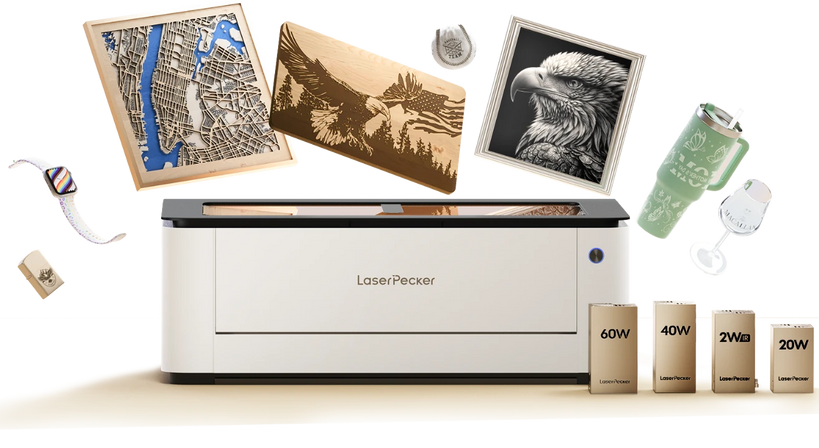
The LaserPecker LX2 is a versatile desktop laser cutter for cutting compatible fabrics into custom patches, appliqué pieces, garment decorations, textile prototypes, and sewing or craft components.
One of the biggest advantages for cloth cutting is pairing the LX2 with the LaserPecker Smart Air Assist.
-
20W, 40W, or 60W Blue Diode Laser Options
Multiple laser-module options provide flexibility for cutting fabrics of different thicknesses and densities, allowing users to select suitable power and speed settings for each textile. -
500 × 305 mm Working Area
The spacious processing area accommodates larger fabric patterns and allows multiple patches, appliqué pieces, or repeated shapes to be arranged and cut in one job. -
12MP/6K Overhead Camera with Point-to-Shape™
The high-resolution camera provides a clear material preview, while Point-to-Shape™ helps align designs with printed patterns, fabric edges, or specific sections of a garment. -
Cutting Precision of ≤0.01 mm
High positioning precision supports intricate curves, small openings, lettering, and detailed pattern pieces that require accurate edges and consistent dimensions.
Step 3: Prepare and Position the Cloth
Lay the fabric flat on the work surface and smooth out any wrinkles before positioning it inside the machine. Lightweight cloth may shift due to airflow or machine movement, so use magnets, masking tape, or fabric holders to keep the material securely in place without covering the cutting area.
Next, import your design file to LaserPecker Design Space or LightBurn and confirm that it fits within the usable workspace.
Step 4: Configure Laser Settings
Select laser power, cutting speed, and the number of passes based on the type and thickness of the fabric. Natural fibers and synthetic materials often require different settings, so there is no single configuration that works for every project.
Before cutting the final design, run a small test pattern on leftover material. Adjust the settings until the fabric cuts cleanly with minimal discoloration, then save the profile for future projects using the same material.
Step 5: Cut and Inspect the Finished Charm
Start the job and monitor the machine continuously. Fabric is combustible, so never leave the laser cutter unattended and keep the machine's recommended fire-safety equipment nearby.
After processing, allow any smoke to clear before removing the material. Check whether every section has separated cleanly and inspect the edges for excessive charring or melting. Record the successful material, thickness, power, speed, and pass settings so the result can be reproduced more consistently in future projects.
FAQs: Hot Questions about Laser Cutting Cloth
Q1. Can a laser cutter cut cloth?
Yes. Many modern laser cutters like diode laser cutter, CO2 laser cutter can cut a wide range of cloth materials, including cotton, polyester, felt, denim, and canvas. The cutting quality depends on the material, laser type, and machine settings. Performing a test cut before your main project helps ensure clean edges and consistent results.
Q2. What cloth works best for laser cutting?
Polyester and synthetic felt are among the easiest materials to laser cut because their edges can lightly seal during the process, helping reduce fraying. Cotton, denim, and canvas can also be laser cut successfully, although they typically require more careful adjustment of power and speed to minimize scorching.
Q3. Does laser cutting prevent cloth fraying?
It depends on the cloth material. Synthetic cloth materials such as polyester often develop sealed edges during laser cutting, which helps reduce fraying. Natural fibers like cotton do not melt in the same way, so while laser cutting provides clean, accurate cuts, the edges may still require finishing depending on the application.
Q4. Can beginners use a laser cutter for cloth projects?
Yes. Many desktop laser cutters are designed with beginner-friendly software and straightforward setup procedures. Starting with simple designs, testing on scrap fabric, and learning how different materials respond to laser settings will help new users build confidence while improving cutting quality.
Q5. What is the best laser cutter for cloth?
The right laser cutter depends on your workflow rather than a single model being suitable for everyone. Compact desktop machines are often a good choice for DIY projects, personalized products, and small businesses, while larger systems with bigger work areas are better suited for batch production, oversized fabric pieces, and professional workshops.
Q6. Is LaserPecker LP2 Plus suitable for cutting cloth?
Yes. The LaserPecker LP2 Plus is suitable for beginners, home workshops, and small custom projects involving fabric, felt, leather, paper, and other craft materials. Its compact desktop design, 10W diode laser, and LightBurn compatibility make it easy to learn while supporting a variety of creative applications beyond cloth cutting.
Q7. Is LX2 better for batch cloth production?
For users producing larger quantities or working with oversized fabric pieces, the LaserPecker LX2 provides advantages such as a 500 × 305 mm working area, camera-assisted positioning, and higher workflow efficiency. These features help streamline repetitive jobs and make it easier to maintain consistent results across multiple production runs.
Q8. Is laser cutting cloth safe?
Laser cutting cloth is safe when the machine is operated correctly and appropriate safety practices are followed. Always use suitable ventilation, monitor the machine during operation, and avoid processing fabrics that are not recommended for laser cutting.
Q9. Can laser cutters cut thick cloth like denim?
Yes. Denim and heavy canvas can be laser cut, although they generally require higher power or slower cutting speeds than lightweight fabrics. Running a test cut first helps determine the settings needed to achieve a clean cut while minimizing scorch marks.
Q10. What software is used for laser cutting cloth designs?
Most laser cutters support vector-based design software that exports formats such as SVG, DXF, or AI. Depending on the machine, users may work with the LaserPecker Design Space or third-party programs such as LightBurn to create, edit, and send cutting files. Using vector graphics helps ensure accurate cutting paths and consistent results.
Conclusion
Laser cutting cloth offers an efficient way to create clean, accurate fabric cuts for everything from DIY crafts and quilting to custom products and small-scale production. By understanding how different cloth materials respond to laser processing, choosing appropriate settings, and following safe operating practices, beginners can achieve reliable results with confidence.
When selecting a machine that matches your workflow, the LaserPecker LP2 Plus is well suited for beginners, home workshops, and small custom projects, while the LaserPecker LX2 is a practical choice for larger fabric pieces and batch production thanks to its expanded workspace and production-focused features.


