


The best acrylic cutting machine depends on the sheet thickness, acrylic color, required edge finish, design complexity, and production volume. A scoring knife may be enough for a few straight cuts in thin sheets, while saws, CNC routers, and laser cutters are better suited to thicker material or more complex work.
In this guide, we compare the most common machines that cut acrylic, explain where each method works best, and show you what to consider when choosing an acrylic sheet cutting machine for crafts, signage, prototyping, or small-batch production.

In this article:
- Part 1: What Is an Acrylic Cutting Machine?
- Part 2: Four Common Types of Acrylic Cutting Machines and Tools
- Type 1: Manual Acrylic Cutting Tools
- Type 2: Saw and Mechanical Cutting Machines
- Type 3: CNC Router for Acrylic Cutting
- Type 4: Laser Cutting Machine for Acrylic
- Part 3: Which Laser Cutting Machine Is Suitable for Acrylic?
- Part 4: FAQs about Acrylic Cutting Machine
Part 1: What Is an Acrylic Cutting Machine?
An acrylic cutting machine is a manual or powered tool used to cut acrylic sheets into specific shapes and sizes. Options range from scoring knives and saws to computer-controlled CNC routers and laser cutters. The main goal is to produce accurate cuts while minimizing cracks, chips, melted edges, and unnecessary finishing work.
Acrylic is rigid but relatively brittle. Uneven pressure or vibration can cause chipping, while excessive heat can melt or distort the cut edge. Choosing the right machine for cutting acrylic therefore involves more than comparing cutting speed. You should also consider sheet thickness, design complexity, edge quality, repeatability, and operating requirements.
For occasional straight cuts, a manual cutter or saw may be sufficient. For detailed shapes or repeat production, a digital acrylic cutter machine generally provides better accuracy and consistency.
Part 2: Four Common Types of Acrylic Cutting Machines and Tools
The four most common options are manual scoring tools, mechanical saws, CNC routers, and laser cutters. Each provides a different balance of cost, precision, edge quality, design flexibility, and production speed.
Type 1: Manual Acrylic Cutting Tools
A scoring knife or handheld acrylic cutter creates a groove along a straight line. The sheet is then positioned over a firm edge and snapped along the score. This method is best suited to thin sheets and simple one-off projects.
Advantages:
- Low purchase cost
- Portable and easy to store
- No electricity or software required
- Suitable for straight cuts in thin acrylic
Limitations:
- Not suitable for curves, holes, or intricate shapes
- Accuracy depends heavily on scoring technique
- Edges may require sanding or polishing
- Thicker sheets are harder to snap and more likely to crack
Type 2: Saws and Mechanical Acrylic Cutting Machines
Table saws, band saws, circular saws, and jigsaws can cut acrylic when fitted with a sharp blade designed for plastic. These tools are practical for straight cuts, rough blanks, and thicker sheets, especially in workshops that already have the equipment.
Advantages:
- Faster than manual scoring for thicker acrylic
- Suitable for long straight cuts and basic curves
- Readily available in many workshops
Limitations:
- Blade contact can cause vibration, chipping, or cracking
- An unsuitable blade or feed rate can melt the edge
- Fine internal details are difficult to produce
- Sanding, scraping, or polishing is often required
Type 3: CNC Router for Acrylic Cutting
A CNC router uses a computer-controlled rotating bit to cut, drill, pocket, and shape acrylic along the X, Y, and Z axes. It is a strong option for thicker sheets, functional parts, slots, beveled profiles, and shallow 3D reliefs.
Successful routing requires a suitable plastic-cutting bit, secure workholding, the correct spindle speed and feed rate, and effective chip extraction. Because the bit physically contacts the sheet, unsuitable settings can produce heat, tool marks, chips, or stress cracks.
Advantages:
- Handles thick acrylic and structural parts
- Supports pockets, grooves, bevels, and 3D profiles
- Produces repeatable parts from digital files
- Works with clear, translucent, and opaque acrylic
Limitations:
- Cut edges normally require finishing for a polished appearance
- Router bits wear and must be maintained or replaced
- Workholding and chip extraction add setup time
- The bit diameter limits very fine internal details
Type 4: Acrylic Laser Cutting Machine
An acrylic laser cutting machine follows a digital path and uses a focused beam to melt and vaporize a narrow line through the sheet. Because the process is non-contact, it can produce small features and complex contours without applying mechanical force to the acrylic.
Laser type is critical. CO2 lasers can generally process clear, translucent, and colored acrylic. Blue diode lasers are usually limited to compatible darker, opaque acrylic because clear material transmits much of the blue wavelength. Always confirm the sheet color, composition, and machine compatibility before cutting.
Advantages:
- High precision for detailed shapes, lettering, and internal cutouts
- Non-contact cutting without blade or bit pressure
- Consistent output from digital designs
- Cutting and engraving can be completed in one workflow
- Some acrylic and laser combinations produce a smooth, glossy edge
Limitations:
- Material compatibility depends on laser wavelength and acrylic color
- Proper enclosure, exhaust, and fire monitoring are essential
- Thicker sheets require more power, slower speeds, or multiple passes
- Incorrect settings can cause flare-ups, edge haze, or distortion
Acrylic Cutting Machine Comparison Table
| Cutting Method | Precision | Typical Edge Finish | Complex Shapes | Key Maintenance | Best Use Case |
|---|---|---|---|---|---|
| Manual Scoring Tool | Low to medium | Usually needs finishing | No | Blade replacement | Straight cuts in thin sheets |
| Mechanical Saw | Medium | May chip or show blade marks | Limited | Blade care and alignment | Long cuts and rough blanks |
| CNC Router | High | Machined; often needs polishing | Yes | Bits, spindle, and chip extraction | Thick parts, pockets, and 3D profiles |
| Laser Cutter | High | Smooth with compatible material and settings | Excellent | Optics, exhaust, and cutting bed | Detailed 2D cutting and engraving |
How to Choose a Laser Cutter for Acrylic
To choose the best laser-based acrylic sheet cutting machine, compare the following factors with the materials and projects you plan to process most often.
Consideration #1: Laser Type and Acrylic Compatibility
Start with the color and opacity of the acrylic. A CO2 laser is the more versatile option for clear and colored acrylic. A blue diode laser can be a practical choice for compatible dark, opaque sheets, but it is generally not suitable for directly cutting clear acrylic.
Consideration #2: Power and Thickness Capacity
More optical power can increase cutting speed and thickness capacity, but wattage alone does not determine the result. Beam quality, focus, motion control, acrylic composition, speed, airflow, and the number of passes also matter. Compare manufacturer test results for the exact laser module and acrylic type you intend to use.
Consideration #3: Working Area and Motion Accuracy
The working area must accommodate your largest sheet or finished part. A rigid frame and accurate motion system help maintain clean curves, consistent dimensions, and properly aligned cutting and engraving.
Consideration #4: Air Assist and Exhaust
Controlled airflow can help clear vapor from the kerf and protect the optics, while effective exhaust removes fumes from the work area. Airflow requirements vary according to material thickness and the desired edge finish, so follow the recommendations for your machine and material.
Consideration #5: Safety Features
Look for an appropriate enclosure, interlocks, an emergency stop, flame detection or monitoring provisions, and a suitable exhaust system. Never leave an operating laser cutter unattended, and do not process unidentified plastics.
Consideration #6: Software and Engraving Support
Choose software that supports your preferred vector formats and provides reliable control over layers, power, speed, passes, and positioning. If you plan to personalize products, confirm that the same machine can align engraving and cutting in one setup.
Part 3: Which Laser Cutting Machine Is Suitable for Acrylic?
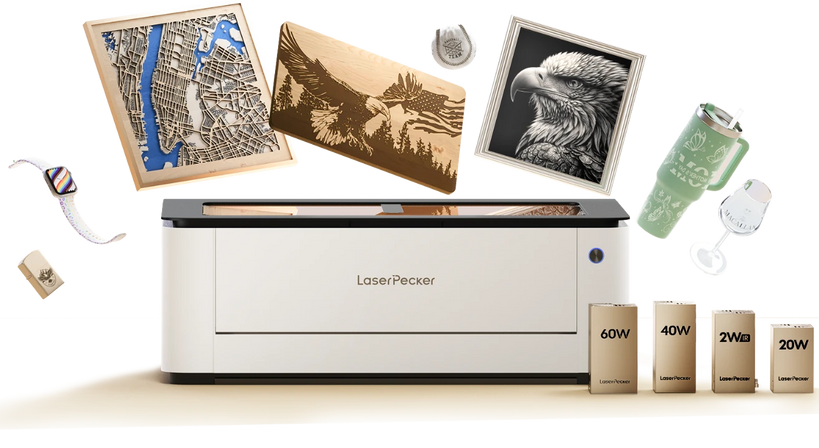
For users cutting compatible dark, opaque acrylic, the LaserPecker LX2 is a versatile desktop option for detailed cutting and engraving. It offers 20W, 40W, or 60W blue diode laser options, a 500 × 305 mm working area, camera-assisted positioning, autofocus, and a high-speed motion system.
The non-contact process is suitable for signs, decorative pieces, models, organizers, and customized products containing curves, holes, lettering, or layered designs. The LX2 can also engrave and cut within the same digital workflow, helping keep graphics and cut lines aligned.
LaserPecker states that the 40W LX2 can cut acrylic up to 20 mm thick in one pass under its specified test conditions. Actual cutting capacity and edge quality vary according to acrylic color and composition, focus, speed, airflow, and other settings. Test the exact sheet before production.
Because the LX2 uses a blue diode laser for acrylic cutting, it is intended for compatible opaque acrylic rather than clear or transparent sheets. If your projects mainly use clear or translucent acrylic, a compatible CO2 laser is generally the better option.
If you use an air pump with the LaserPecker LX2, your cuts will be even better. The air helps keep the cutting area clean, so you get a cleaner finish.
Part 4: FAQs About Acrylic Cutting Machines
Q1. What is the best machine for cutting acrylic?
A laser cutter is often the best choice for intricate 2D shapes, repeatable production, and smooth edges. A CO2 laser is the most versatile laser option because it can process clear, translucent, and colored acrylic. A compatible high-power diode laser can cut many dark, opaque sheets, while a CNC router is better for thick parts, pockets, bevels, and 3D profiles. For a few straight cuts in thin acrylic, a scoring tool may be sufficient.
Q2. Can a Cricut machine cut acrylic sheets?
A Cricut is not a general-purpose acrylic sheet cutting machine. Some models may score or cut certain very thin plastic sheets listed as compatible by the manufacturer, but they are not designed to cut standard thick acrylic panels. Use a scoring tool, saw, CNC router, or laser cutter for conventional acrylic sheets.
Q3. What type of laser is best for cutting acrylic?
A CO2 laser is the most versatile choice because its wavelength is readily absorbed by clear and colored acrylic. Blue diode lasers are generally suitable only for compatible darker, opaque acrylic and normally cannot directly cut clear acrylic. Fiber lasers are primarily intended for metals and are not the standard choice for cutting acrylic sheets.
Q4. Can a diode laser cut clear acrylic?
A standard blue diode laser generally cannot directly cut clear acrylic because the material transmits most of the blue light instead of absorbing enough energy along the cutting path. A surface coating may help with marking in some applications, but it does not turn a diode machine into a reliable clear-acrylic cutter. Use a compatible CO2 laser or a mechanical cutting method for clear sheets.
Q5. How thick can an acrylic cutting machine cut?
The maximum thickness depends on the cutting method, machine power, acrylic type and color, focus, speed, airflow, and number of passes. Manufacturer figures are normally based on specific test conditions and should not be treated as universal limits. For example, LaserPecker states that the 40W LX2 can cut acrylic up to 20 mm thick in one pass under specified conditions. Always test the actual sheet before production.
Q6. Is a laser cutter or CNC router better for acrylic?
Choose a laser cutter for detailed 2D contours, small internal features, engraving, and minimal tool contact. Choose a CNC router for thick stock, pockets, channels, beveled edges, and 3D profiles. A laser may provide a smoother edge on compatible acrylic, while routed edges usually require polishing when optical clarity is important.
Q7. How do you cut acrylic without melting, chipping, or cracking it?
For mechanical cutting, use a sharp plastic-specific blade or bit, support and secure the sheet correctly, and match the feed rate to the blade or spindle speed. For laser cutting, use the correct focus, power, speed, and airflow, keep the optics and cutting bed clean, and provide effective exhaust. Test a scrap piece before cutting the final project.
Conclusion
There is no single acrylic cutting machine that is best for every project. Manual tools are economical for thin sheets and straight cuts, mechanical saws are useful for basic workshop cutting, CNC routers handle thick parts and machined features, and laser cutters excel at detailed 2D designs and repeatable cutting and engraving.
Before choosing a machine, consider the acrylic type, color, thickness, required edge finish, project size, and production volume. The LaserPecker LX2 is a strong option for compatible dark, opaque acrylic, while clear or translucent sheets generally require a CO2 laser or a suitable mechanical cutting method.
The best machine for cutting acrylic is ultimately the one that matches your material, design requirements, safety setup, and production workflow.


